
Field note · 2025-11-03
PHP-CGI (CVE-2024–4577)(LetsDefend)
Originally published on Medium: https://medium.com/@brandonlove2150/php-cgi-cve-2024-4577-letsdefend-33568e938853?source=rss-024d132ba4b7——2
Today, I took on another challenge from LetsDefend (PHP-CGI).
Today, I took on another challenge from LetsDefend (PHP-CGI). This Challenge provided a nice little backstory and a link to a walkthrough; otherwise, there was little to go on. I absolutely dislike using walkthroughs because I want to progress and learn as much as possible while working through these challenges on my own. I will review the walkthrough if I’m absolutely stuck and the hints don’t help at all.
Backstory
You will confront an attempted exploitation of a newly discovered and unpatched vulnerability (CVE-2024-XXXX) in a critical software component within your organization’s infrastructure. The CVE allows for remote code execution, posing a significant threat if successfully exploited. At 12:05 PM UTC, an alert is generated by the Intrusion Detection System (IDS) and Intrusion Prevention System (IPS), indicating an attack on one of your web servers. Your task is to analyze the provided artifacts, confirm the exploitation attempt, and answer the provided questions.
File Location: C:\Users\LetsDefend\Desktop\ChallengeFile\artifacts.7z
Walkthrough
The first thing I like to do when attempting these challenges is to review the tools to see what is available in case I need them. The next step I take is to open the ChallengeFile, unzip the file if necessary, and then look for all the .txt files (ignoring the readme files) to see if there are any clues.
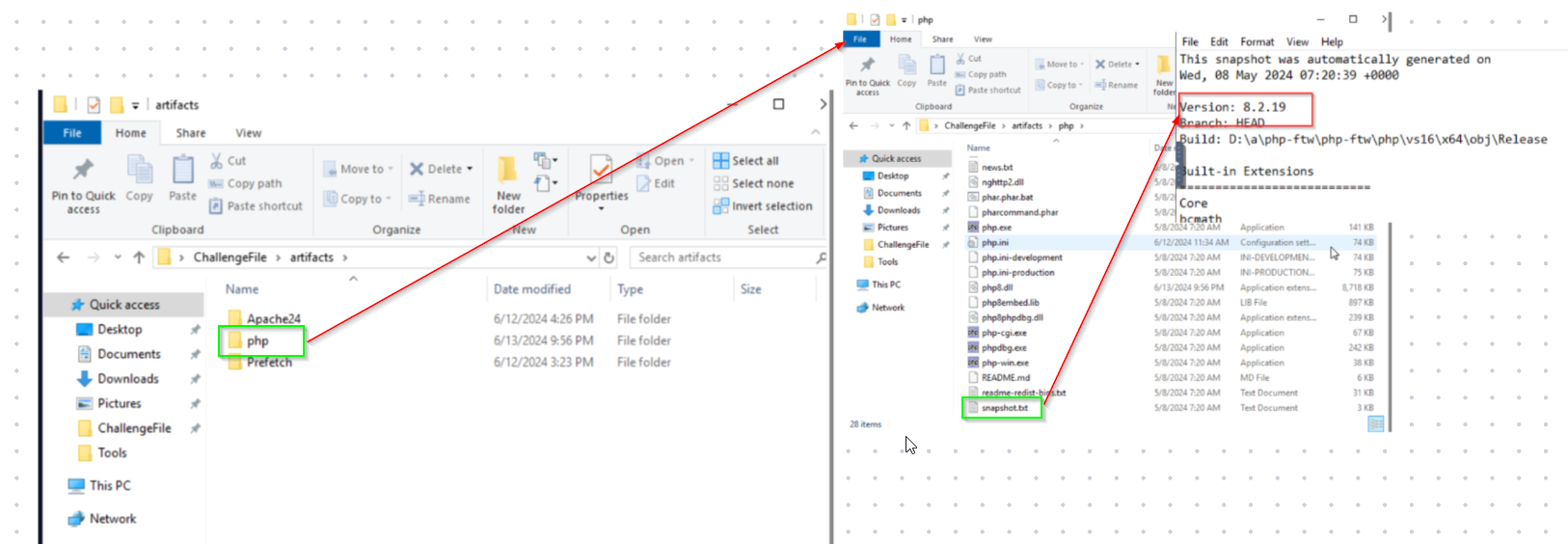
PHP Screenshot
This file caught my attention because the Challenge is based on a PHP exploit. PHP is a popular open-source scripting language. Attackers can use %AD and attach it to the query string of an HTTP request line. PHP misinterprets specific URI parameters as PHP options. This enables an attacker to manipulate the input to run malicious commands remotely.
Opening the snapshot.txt file was very beneficial for the first question. This file contains the answer to the first question: What version of PHP was running on the server during the incident? The image above illustrates the steps to arrive at this answer.
Question 2: When PHP is configured to run as CGI, which directive in httpd.conf specifies the scripts that handle requests for PHP files?
PHP directives are configuration settings used to control the behaviours of PHP functions on your site. We know that we need to access the httpd.conf for this answer. Performing a quick search of the document using PHP-CGI reveals that there is an action directive.
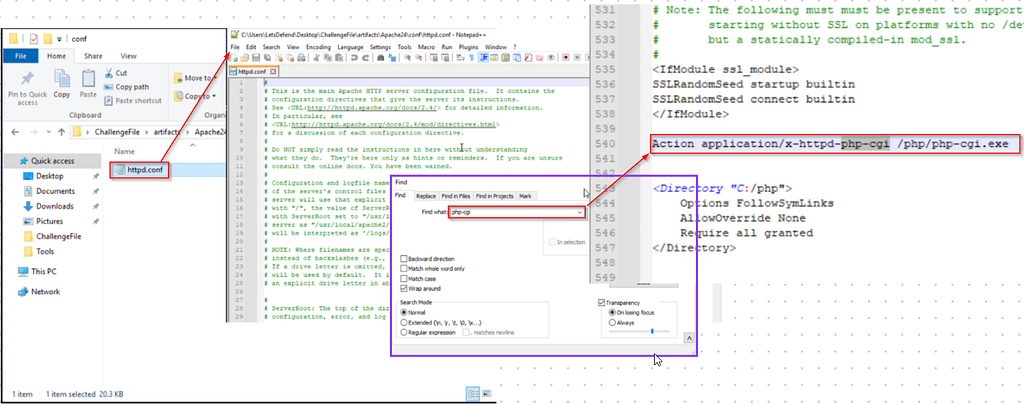
httpd.conf
Question 3: What is the IP address of the attacker who attempted to exploit our server?
Question 5: What version of Apache is running on the server?
I searched the error log for any traces of suspicious IP addresses. There were several logs of scripts running the php-cgi.exe from the 192.168.110.1 IP address. This log also provides us with the server’s version.
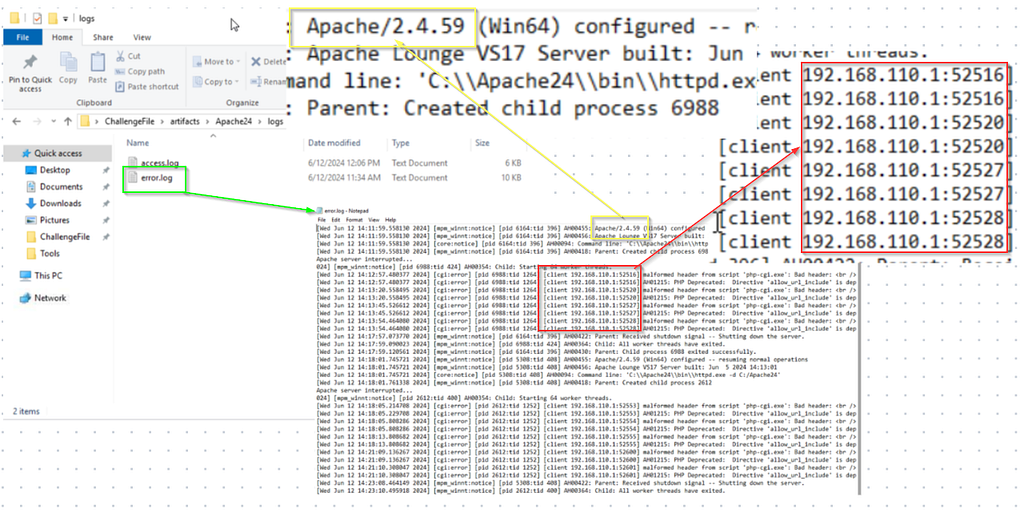
Error Log
Question 4: The attacker targeted a specific page on the server with malicious payloads. Which page did the attacker target with malicious payloads?
We know the attacker was actively trying to access a page on the server; we can view this in the access log to find the answer. Analyzing the log, we can see they were trying to access the upload.php page.
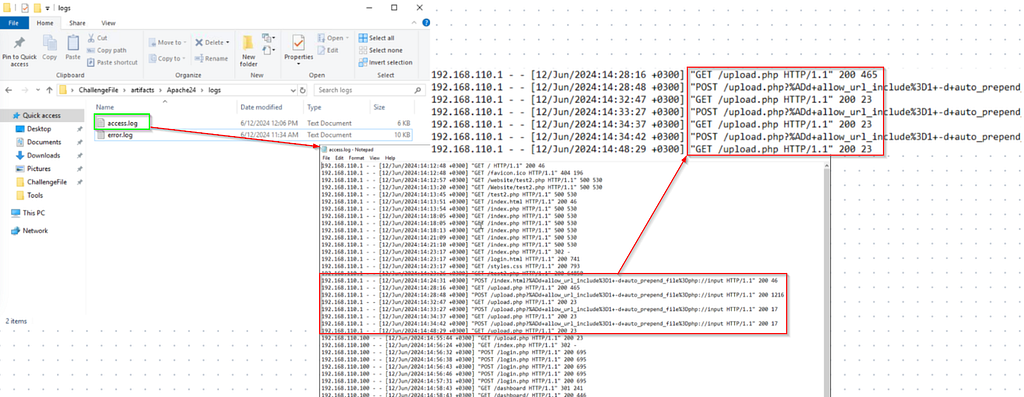
Access Log
Question 6: The attacker successfully executed commands on the server. What was the first process initiated by the attacker’s commands during their successful attempt?
Question 7: Before the attacker was detected and blocked, they executed another command, launching a new process. What process was launched by this command?
To find these answers, we need to examine the access log to determine precisely when the attacker successfully ran the script, which started at 15:03:07. Using this information, we must search the prefetch file to identify the commands that correlate with the specified timeframe. We can see that WHOAMI.EXE was run, and the last command run was CALC.EXE.
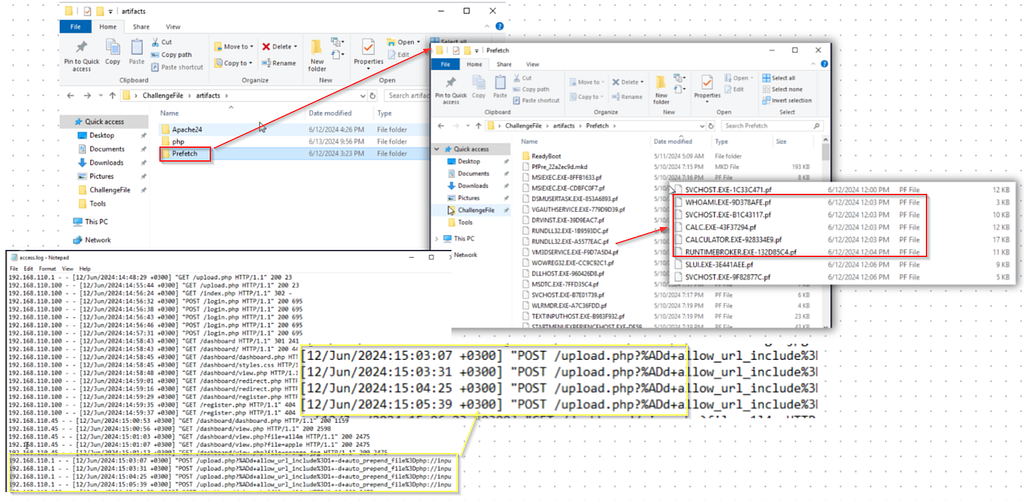
Prefetch File
Question 8: What is the CVE number of the exploit used by the attacker?
Doing a quick search about this type of attack reveals what the Challenge was about (CVE-202-4577).
Summary
We worked on a Let’sDefend PHP-CGI challenge that simulated an RCE attempt against a web server using a PHP-CGI parsing vulnerability (CVE–2024–4577). You unpacked the provided artifacts, inspected the .txt snapshots, and read the server logs to answer the questions. The PHP version was revealed in snapshot.txt, specifically in the httpd file.conf showed the Action directive used when PHP runs as CGI, the attacker IP was 192.168.110.1, and the malicious requests targeted upload.php (seen in the access log), and Apache’s version appeared in the error log. By correlating the access log timestamp (15:03:07) with the prefetch data you identified, the commands the attacker ran — whoami.exe first and later calc.exe — and confirmed the exploit as CVE-2024-4577. Overall, the exercise practiced artifact triage, timeline correlation, log parsing, and mapping indicators to a known CVE.

Badge
Source: Originally published on Medium