
Field note · 2025-11-19
Golden Ticket (Walkthrough)
Originally published on Medium: https://medium.com/@brandonlove2150/golden-ticket-walkthrough-d47dd458994d?source=rss-024d132ba4b7——2
LetsDefend Challenge ### Challenge An alert has been triggered within a network, indicating a possible attack on the Domain Controller (DC).
LetsDefend Challenge
Challenge
An alert has been triggered within a network, indicating a possible attack on the Domain Controller (DC). The security team has detected suspicious activity suggesting lateral movement attempts from a compromised workstation to the DC. The attacker, identified as having infiltrated the network, appears to be targeting sensitive systems. An investigator is tasked with analyzing network traffic, reviewing event logs, and identifying how the attacker is navigating through the environment. The goal is to trace the attacker’s steps, determine their access point, and prevent further escalation to the Domain Controller.
File Location: C:\Users\LetsDefend\Desktop\ChallengeFile\goldenticket.7z
File Password: infected
Golden TIcket
Researching what a Golden Ticket is, MITRE ATT&CK suggests that attackers who have a KRBTGT account password hash can forge Kerberos ticket-granting tickets(TGT). The golden ticket enables malicious actors to generate authentication credentials for any account in Active Directory. They can request ticket-granting service (TGS) tickets that will allow access to specific resources. Adversaries can get the KRBTGT password hash using OS Credential Dumping and privileged access to a domain controller.

created with AI
Walkthrough
To solve the questions for this Challenge, I looked in the Windows Security Logs for Event Codes 4768 (Kerberos Authentication request), 4769 (Kerberos Service Ticket request), 4624 (Successful Logon), and 4634/4647 (Logoff events).
There were so many logon requests that I filtered the file to 4776, which is used to validate credentials via NTLM authentication, to narrow the search.
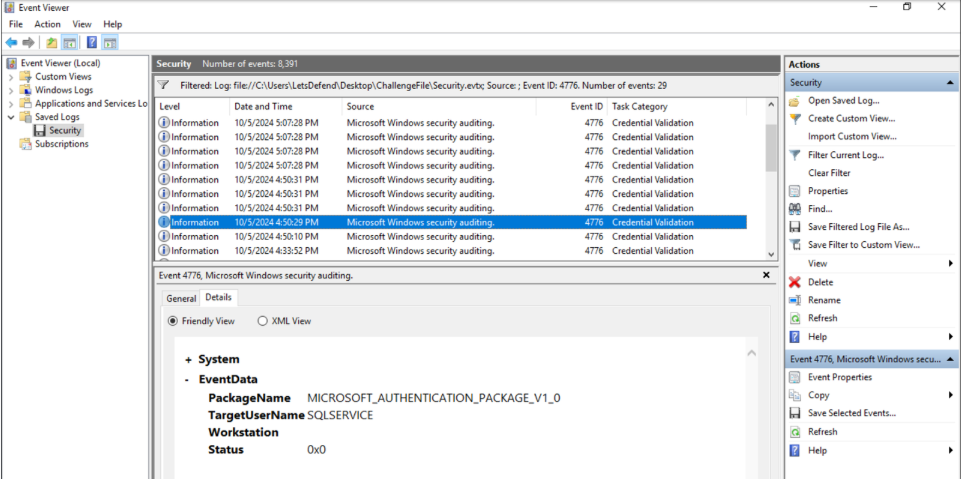
Credential Validation
From this screenshot, an event shows that SQLSERVICE was accessed. I used this information to examine EventID 4624 to find the logon information for the suspected service.

Suspected Activity
Looking at this specific event, we can see the time, the requested service, and the source’s IP address and port number. Since this is a generic challenge, we cannot actually analyze this event ID correctly. If I had access to domain baselines, I would check Kerberos ticket lifetimes against them and flag tickets with abnormal lifetimes (extremely long lifetimes or unusual start/end times).
AS-REP Attack
The next part of the Challenge is dealing with an AS-REP attack. This is when a user requesting access to a resource initiates communication with the DC by sending an Authentication Server Request (AS-REQ) message, with a timestamp encrypted using the hash of their password. When the DC decrypts the timestamp using the hashed password, it sends an AS-REP message with the TGT to the user.
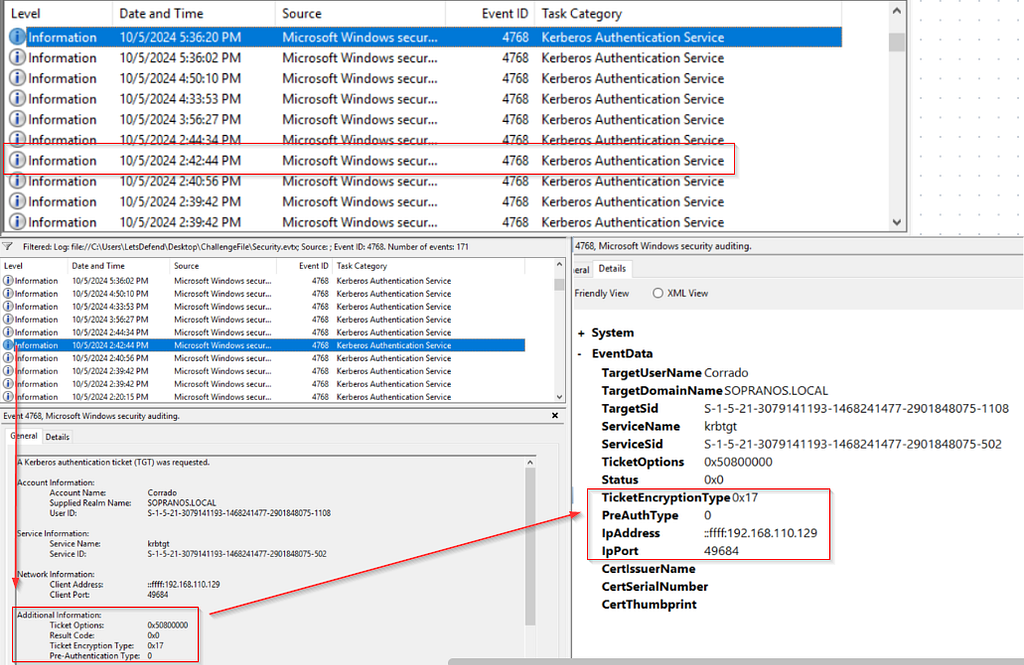
Suspected AS-REP
To find the AS-REP attack, MITRE ATT&CK suggests monitoring Kerberos AS-REQ/AS-REP authentication patterns where preauthentication is disabled (Event ID 4768 with Pre-Authe Type 0) and correlating these requests with subsequent service ticket activity and anomalies, such as requests using weak RC4 encryption (0x17).
Reviewing the logs, we can see that a TicketEncryptionType 0x17 was used with a PreAuthType of 0, which is the suspicious activity we were looking for.
The Challenge aims to identify the compromised user account and the time the Golden Ticket was used. Using the questions as context clues, we can assume the attacker is trying to get access to the most privileged account.
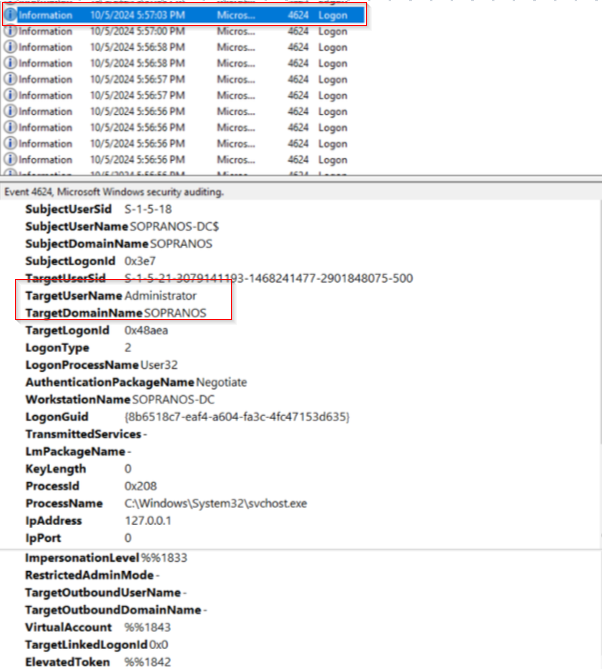
Suspected Logon
Filtering the logs by the keyword administrator and checking the timestamps after the AS-REP attack, and the DC system access, this event happened an hour after the SQLSERVICE was accessed.
Summary
This Challenge gave me more understanding of what golden tickets are and how they can be used for malicious activity. I also got to practice reading more Windows security logs. To reinforce the valuable lessons in this Challenge to detect a Golden Ticket, we can follow these simple steps that will help find the suspicious forged Kerberos Golden Ticket:
Step 1: Check if Kerberos tickets look too long-lived or nonstandard
Step 2: Flagging old/weak encryption types that shouldn’t be used anymore.
Step 3: Looking for weird or broken logon/logoff event data.
Step 4: Detecting service ticket requests that skip the normal TGT step
Step 5: Watching for strange admon-like activity across many systems that suggests someone is abusing high-level access.
Source: Originally published on Medium