
Field note · 2025-11-23
Interlock Ransomware
Originally published on Medium: https://medium.com/@brandonlove2150/interlock-ransomware-47b4154e27e7?source=rss-024d132ba4b7——2
LetsDefend Walkthrough Today, I took on the Interlock Ransomware challenge from LetsDefend.
LetsDefend Walkthrough
Today, I took on the Interlock Ransomware challenge from LetsDefend. This challenge helps build skills using the IDA program and analyzing ransomware files. Let’s dive into this challenge and follow along step by step!
Background
Your Company has detected a ransomware infection on one of its Linux systems. This ransomware is designed to encrypt critical files and demand a ransom for their recovery, which significantly disrupts business operations. Once the system is infected, the ransomware scans for valuable data, including sensitive documents and configuration files, and encrypts them using a strong encryption algorithm.

Walkthrough
After we extract the file from the challenge, we need to open it with IDA to analyze its contents.
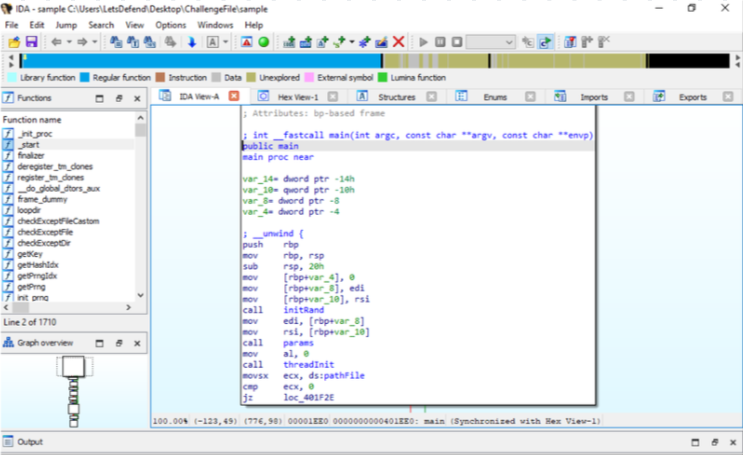
IDA running the ransomware file
Let’s look at the questions to get a starting point for our analysis.
What is the address of the function that handles the parameters executed by the ransomware?
After successfully encrypting a file, what extension did the ransomware add to it?
What is the address of the function that generates the random key used by ransomware for encryption?
Which API was used to move the file pointer to the end of the file in the function that adds padding to the files?
What value is used to retrieve the last four bits of the "fileSize" in the function that creates padding for files?
What is the key length used for RSA encryption in the "startCrypt" function, represented in hexadecimal?
What is the name of the ransomware note created by the toNote function?
What is the TOR ransomware link mentioned in the ransomware note?
Now that we have our reference points, we can proceed to analyze this file. While searching through the function file, if we click the params function, we can navigate to the hex data view and find the address. Looking at the image below, we can see the address to the parameter function; you will then need to convert it to the 9 characters it requires.
Hint: the starting characters are 0x0
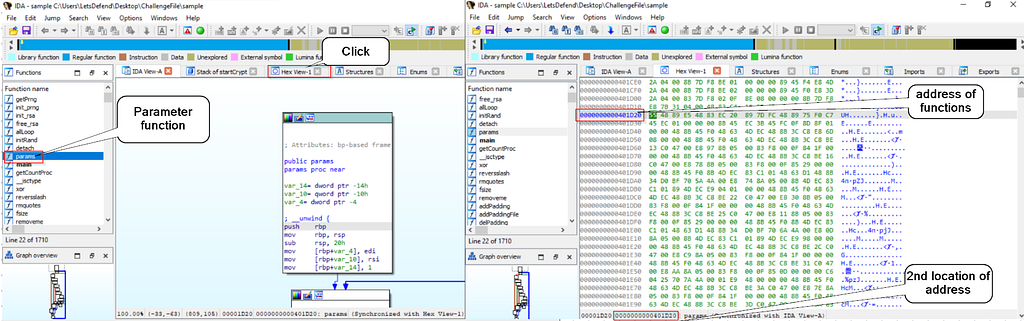
Address of Parameter function
Since we found this address, let’s examine the other address in Question 3. Looking in the function files, there is a function that generates keys. Just as in Question 1, we will need to navigate to the Hex value to find the function’s address. In the image below, we can see the address of the GenerateKey function.
Hint: this question wants 11 characters and the starting characters are 0x0.
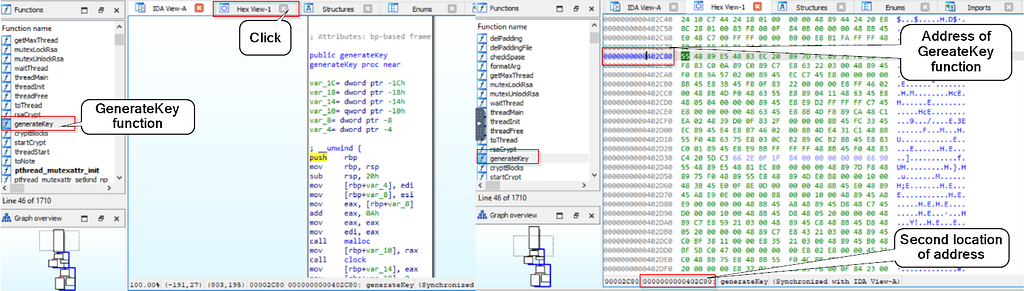
GenerateKey Address
Since finding the function addresses is now out of the way, we can begin analyzing the code inside the file. To answer the second question, navigate to the startCrypt function and analyze the code.
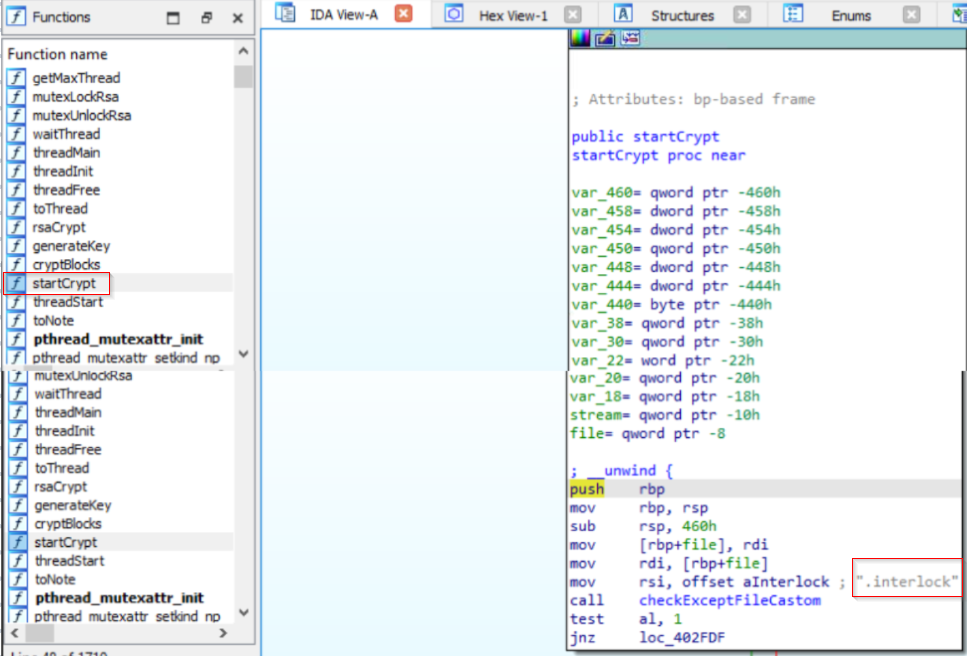
startCrypt function
mov     rdi, rax                   ; dest = var_440
mov     rsi, offset aInterlock     ; src  = ".interlock"
So if var_440 currently holds “C:\docs\report.docx”, after this call, it becomes: “C:\docs\report.docx.interlock”.
Now, focusing on theaddpadding function, we can answer the following two questions. An API is called in the first block of the function, as shown in the image below.
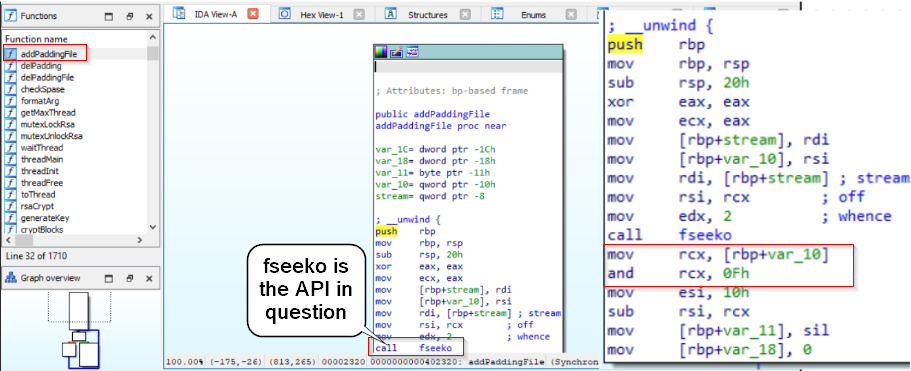
API
mov rax, [rbp+var_10]   ; rax = fileSize
and rax, 0Fh            ; keep only the lowest 4 bits
These lines of code, found right after the fseeko, are using a bitmask of 0xF.
Going back to the startCrypt function and analyzing its code, there are two specific blocks we need to look at.
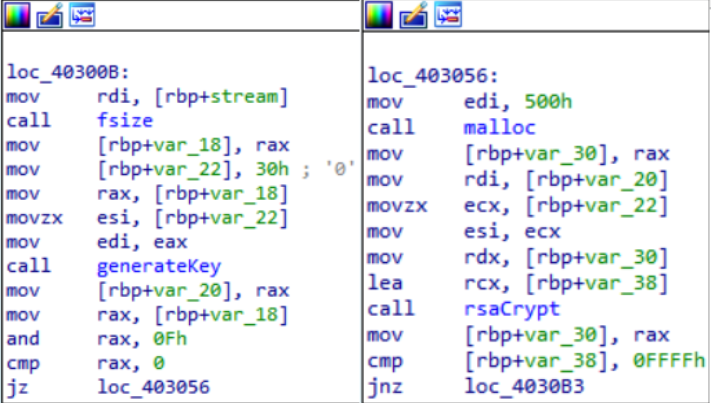
startcyrpt function
mov     [rbp+var_22], 30h        ; store 0x30
...
movzx   esi, [rbp+var_22]        ; 2nd arg
mov     edi, eax                 ; 1st arg
call    generateKey
mov     rdi, [rbp+var_20]        ; pointer to key
movzx   ecx, [rbp+var_22]        ; load 0x30 again
mov     esi, ecx                 ; 2nd arg = 0x30
...
call    rsaCrypt
Two values are repeated to determine the encryption key length, [rbp+var_22], which is set to 30h. That tells us the key length used for RSA encryption is 0x30 bytes.
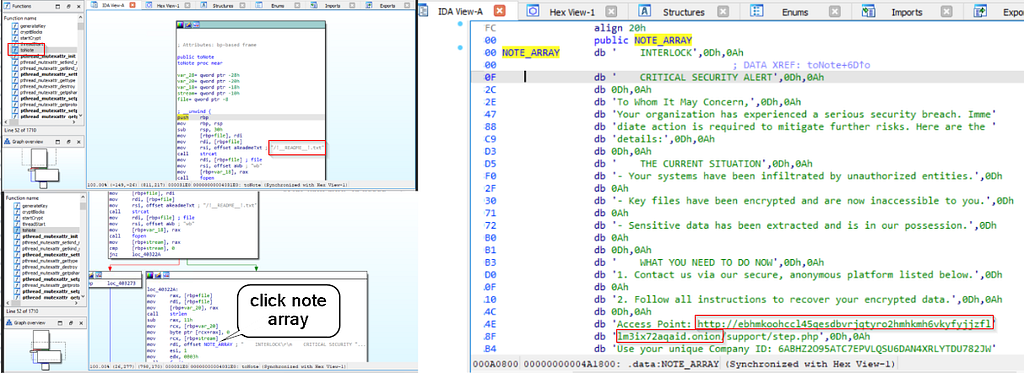
toNote function
There is a function that embeds a message to the target organization. This function, toNote, includes a file named readme.txt. Looking further into the code, there is a NOTE_ARRAY, and when clicked, we can view the message details and find the website the attacker wants the organization to visit.

Badge
Summary
In this blog post, I walked through the Interlock Ransomware challenge on LetsDefend, focusing on practicing static analysis with IDA. The scenario involves a Linux system hit by ransomware that scans for valuable data, encrypts it with strong cryptography, and appends a new extension. Using IDA, I first identified key functions and their addresses, including the parameter-handling function and the generateKey routine. I then analyze startCrypt to see how encrypted files are renamed with the “.interlock” extension and how the RSA key length (0x30 bytes) is passed to generateKey and rsaCrypt. Next, I examine addPadding and addPaddingFile, noting the use of fseeko to move the file pointer and a 0x0F bitmask to grab the last four bits of the file size for padding logic. Finally, I look at the toNote function, which creates a readme.txt ransom note containing the attacker’s TOR site, tying together how this ransomware both encrypts data and delivers its extortion message.
Source: Originally published on Medium