Field note · 2026-06-30
Unpacking Malware Event 91 (LetsDefend)
Originally published on Medium: https://medium.com/@brandonlove2150/unpacking-malware-event-91-letsdefend-155bc8cb2371?source=rss-024d132ba4b7——2
Every security incident begins with a single alert. For SOC analysts, the challenge isn’t simply responding to alerts.
Every security incident begins with a single alert.
For SOC analysts, the challenge isn’t simply responding to alerts. It’s determining whether an isolated event is the beginning of a much larger compromise. In this case study, we’ll walk through Malware Event 91, where a seemingly harmless Python download resulted in malware persistence through a Windows Scheduled Task.
This investigation demonstrates the importance of endpoint visibility, threat intelligence, and rapid containment.
Initial Detection
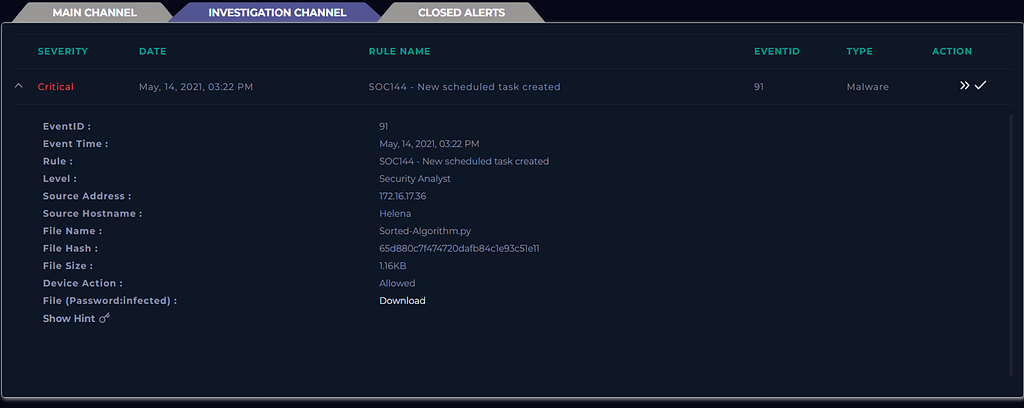
The investigation alert began on May 14, 2021, at 3:22 PM, when the SIEM generated the following high-severity alert:
SOC144 – New Scheduled Task Created
Hostname: Helena
Domain: LetsDefend
Operating System: Windows 10
IP Address: 172.16.17.36
Scheduled Tasks are one of the most common Windows persistence techniques leveraged by attackers. Because they can automatically execute malicious code after reboots or at scheduled intervals, unexpected task creation is always worth investigating.
System Alert
Tracing the Initial Infection
Reviewing browser activity revealed that the user had been visiting legitimate GitHub repositories before downloading a ZIP archive from an unverified repository.
Legitimate Repository
https://github.com/skulpt/skulpt
Malicious Download
https://github.com/pythonguru2021x/Sorted-Algorithm/archive/refs/heads/master.zip
Inside the archive was a small Python script:
Filename: Sorted-Algorithm.py
SHA1: 65d880c7f474720dafb84c1e93c51e11
Size: 1.16 KB
Although the script appeared harmless, it successfully bypassed preventive controls and reached the endpoint.
This serves as a reminder that attackers increasingly abuse trusted platforms like GitHub to host malicious payloads, relying on user trust rather than exploiting software vulnerabilities.
Malware Execution
Endpoint telemetry allowed analysts to reconstruct the attack timeline.
At 3:22 PM, the user executed the downloaded Python script:
python.exe C:/Users/Helena/Downloads/Sorted-Algorithm.py
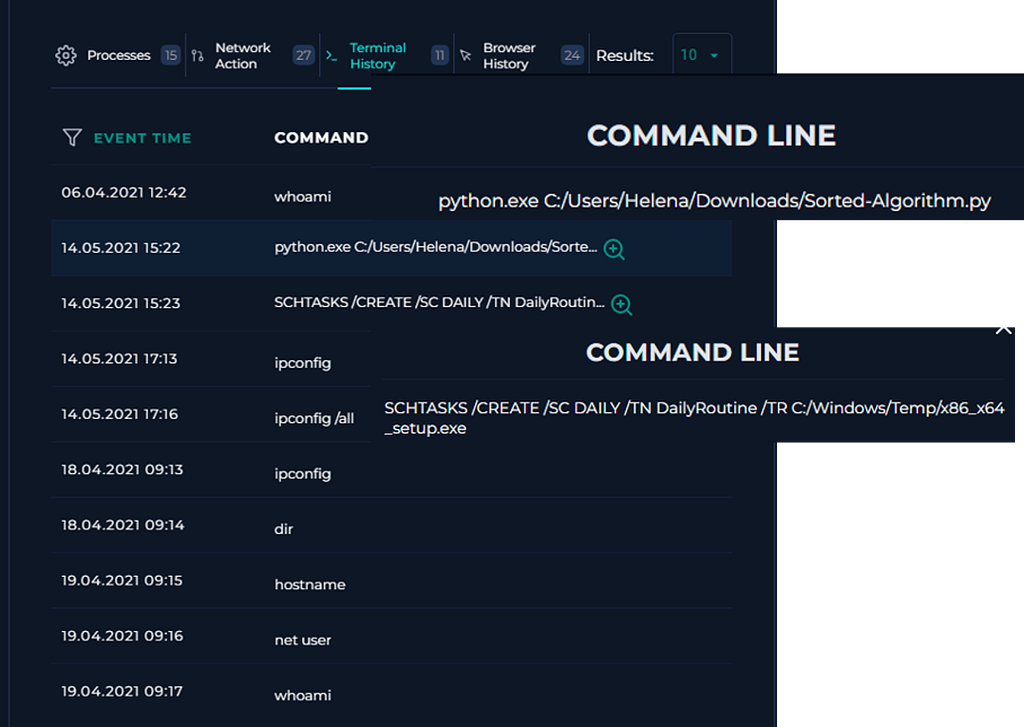
Less than one minute later, the malware established persistence using Windows Task Scheduler.
The following command was observed:
SCHTASKS /CREATE /SC DAILY /TN DailyRoutine /TR C:/Windows/Temp/x86_x64_setup.exe
This command created a scheduled task named DailyRoutine that launched an executable hidden within the Windows Temp directory every day.
Using generic names like DailyRoutine helps malware blend into legitimate scheduled tasks, making manual detection more difficult.
Persistence Mechanism
The malware relied on a classic Windows persistence technique:
- Creation of a Scheduled Task
- Payload stored in C:\Windows\Temp
- Daily execution after reboot
- Minimal user interaction required
Even though the original Python script may have appeared insignificant, its sole purpose was to establish long-term persistence through a secondary payload.
This illustrates why analysts should always investigate what happens after a suspicious script executes – not just the script itself.
Threat Intelligence Analysis
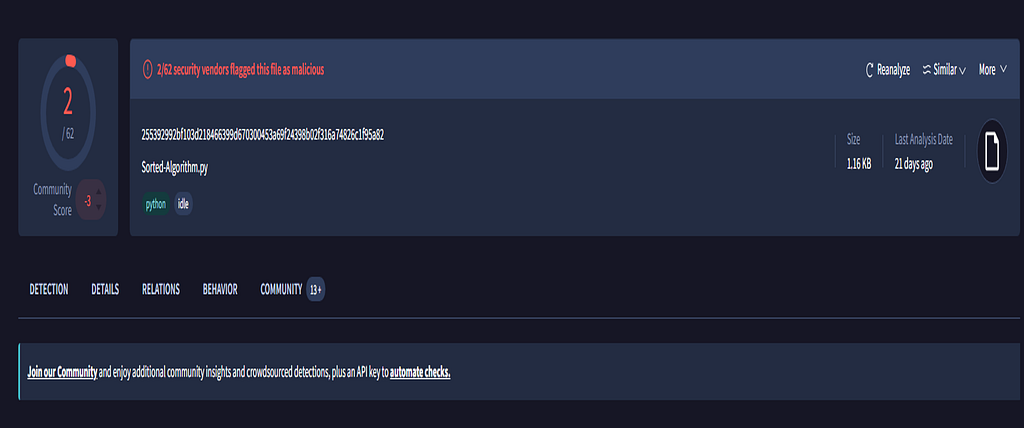
The downloaded Python file was submitted to VirusTotal for reputation analysis.
Results showed:
- 2/62 security vendors detected the file as malicious
Virus Total
While only a small number of antivirus engines identified the threat, low detection rates are common with newly created or lightly obfuscated malware.
Threat intelligence should therefore complement – not replace – behavioral detections such as process creation, Scheduled Task monitoring, and EDR telemetry.
Incident Response
Following validation of the malicious activity, the SOC initiated containment procedures.
- Endpoint Isolation
Using the organization’s EDR platform, analysts immediately isolated the compromised workstation from the network.
This prevented:
- Command-and-control communication
- Additional payload downloads
- Potential lateral movement
- Credential Reset
Because the host had been compromised, the affected user’s credentials were reset to reduce the risk of account abuse.
These actions successfully contained the incident before additional systems were affected.
MITRE ATT&CK Mapping
Tactic Technique
Initial Access User Execution (T1204)
Execution Command and Scripting Interpreter: Python (T1059)
Persistence Scheduled Task/Job (T1053.005)
Defense Evasion Masquerading Through Legitimate Platforms
Command and Control Prevented through EDR Isolation
Mapping incidents to the MITRE ATT&CK framework provides valuable context for understanding attacker behavior and helps identify detection opportunities across the attack lifecycle.
Lessons Learned
This investigation reinforced several important defensive principles:
- Trusted websites can host untrusted content. Attackers frequently abuse legitimate platforms like GitHub to distribute malware.
- * Monitor persistence mechanisms. Scheduled Tasks, Registry Run Keys, Startup folders, and Windows Services remain common methods attackers use to maintain access.
- * Behavioral detection is essential. Even when antivirus signatures fail, endpoint telemetry can reveal malicious activity.
- * Rapid containment limits impact. The ability to isolate compromised endpoints quickly is one of the most effective capabilities an SOC can have.
Final Thoughts
Malware rarely announces itself with obvious indicators. More often, it begins with a simple download, a trusted website, or a seemingly harmless script.
In this case, a 1.16 KB Python file was all it took to establish persistence on a Windows endpoint. Fortunately, endpoint telemetry, behavioral analytics, and a rapid incident response process stopped the attack before it could progress further.
For defenders, every alert tells a story. The analyst’s job is to uncover that story before the attacker writes the next chapter.
Thanks for reading! If you enjoy practical SOC investigations, DFIR walkthroughs, and malware analysis, follow me for more cybersecurity case studies.
Source: Originally published on Medium