Wazuh SIEM + VirusTotal + Action1 Patch Management Lab
Wazuh SIEM Deployment with Threat Intelligence & Patch Automation
Overview
This project documents the deployment of a full security monitoring and remediation lab using:
- Wazuh (SIEM + HIDS)
- Ubuntu Server (Manager)
- Windows & Linux endpoints
- VirusTotal (threat intelligence enrichment)
- Action1 (patch management)
The lab simulates a real-world SOC lifecycle:
Detect → Enrich → Remediate → Validate
Architecture diagram
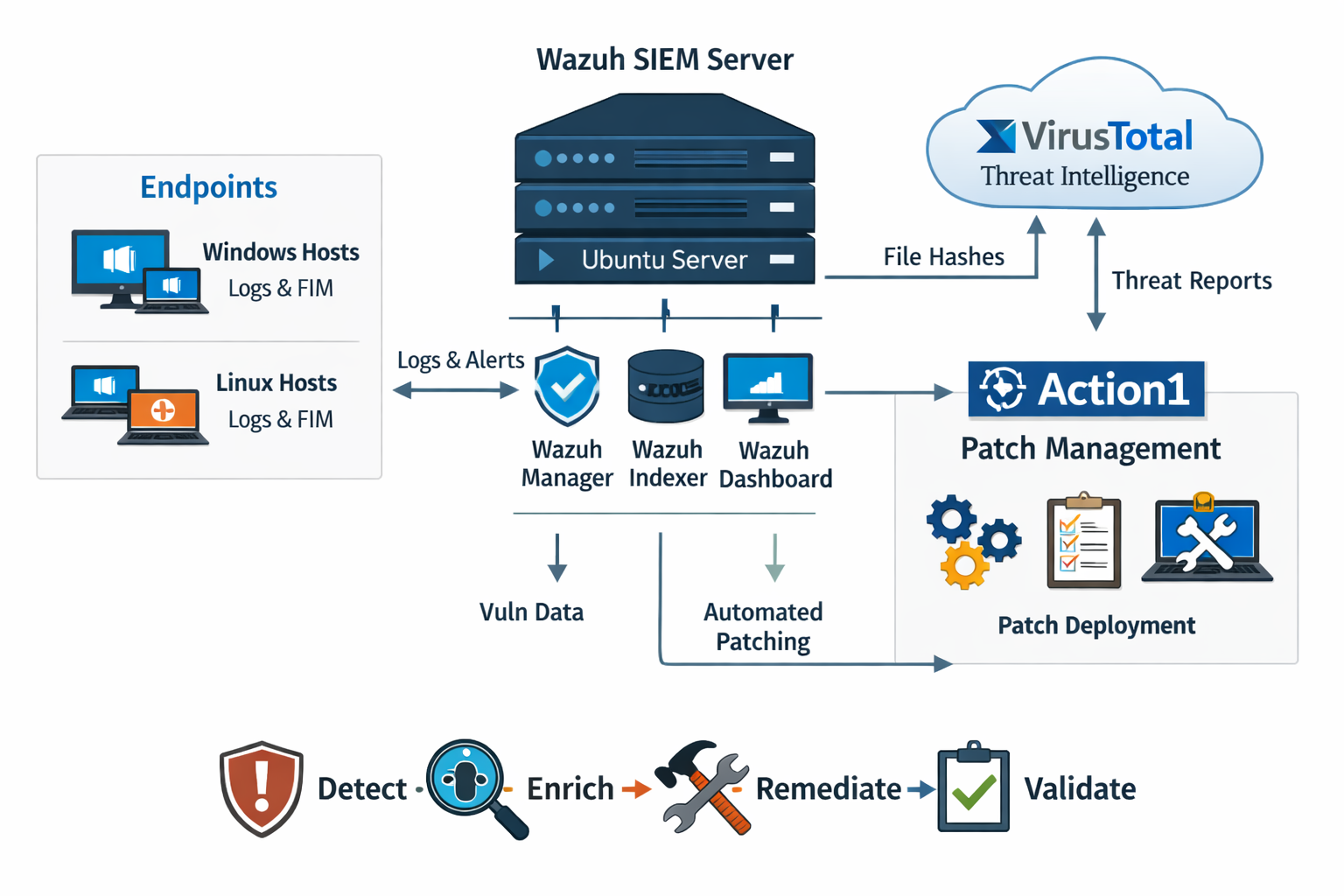
Figure 1: High-level architecture of Wazuh, endpoints, VirusTotal integration, and Action1 patch workflow.
Environment
| Component | Role |
|---|---|
| SIEM | Wazuh |
| Server OS | Ubuntu Server |
| Endpoints | Windows 10/11, Ubuntu Linux |
| Threat intelligence | VirusTotal API |
| Patch management | Action1 |
1️⃣ Wazuh deployment on Ubuntu
Installed Wazuh All-in-One:
curl -sO https://packages.wazuh.com/4.x/wazuh-install.sh
sudo bash wazuh-install.sh -a
Verified services:
sudo systemctl status wazuh-manager sudo systemctl status wazuh-indexer sudo systemctl status wazuh-dashboard
Screenshot: Wazuh dashboard
Figure 2: Wazuh dashboard showing active agents and alert summary.
2️⃣ Endpoint onboarding
Windows agent
Install and start the agent:
msiexec.exe /i wazuh-agent.msi /q WAZUH_MANAGER="<server-ip>" WAZUH_REGISTRATION_SERVER="<server-ip>"
NET START WazuhSvc
Screenshot: Windows agent connected
Figure 3: Windows endpoint successfully registered in Wazuh.
Linux agent
Install and enable the agent:
sudo dpkg -i wazuh-agent.deb
sudo systemctl enable wazuh-agent
sudo systemctl start wazuh-agent
Screenshot: Linux agent connected
Figure 4: Linux endpoint successfully reporting to Wazuh.
3️⃣ File Integrity Monitoring (FIM)
Monitored download directories:
Windows
C:/Users/*/Downloads
Linux
/home/*/Downloads
Screenshot: FIM alert example
Figure 5: File creation event detected in Downloads directory.
4️⃣ VirusTotal integration
Configured in:
/var/ossec/etc/ossec.conf
Added the integration block:
<integration>
  <name>virustotal</name>
  <api_key>YOUR_API_KEY</api_key>
  <group>syscheck</group>
  <alert_format>json</alert_format>
</integration>
Reloaded systemd and restarted Wazuh Manager:
sudo systemctl daemon-reload
sudo systemctl restart wazuh-manager.service
Screenshot: VirusTotal enriched alert
Figure 6: Wazuh alert enriched with VirusTotal detection ratio.
5️⃣ Vulnerability detection
Enabled vulnerability detection to identify:
- Missing security patches
- Outdated software versions
- Known CVEs
Screenshot: Vulnerability dashboard
Figure 7: Detected vulnerabilities mapped to CVEs.
6️⃣ Patch management with Action1
Installed the Action1 agent on endpoints and configured:
- Auto-approve critical patches
- Scheduled maintenance windows
- Controlled reboots
- Compliance tracking
Screenshot: Action1 patch deployment
Figure 8: Patch deployment and compliance view in Action1.
🔄 Integrated security lifecycle
| Phase | Tool | Function |
|---|---|---|
| Log collection | Wazuh | Centralized monitoring |
| File detection | Wazuh FIM | Detect new downloads |
| Threat enrichment | VirusTotal | Hash reputation lookup |
| Vulnerability detection | Wazuh | Identify exposure |
| Patch remediation | Action1 | Deploy updates |
| Validation | Wazuh | Confirm compliance |
Skills demonstrated
- SIEM deployment & configuration
- Windows & Linux agent management
- Threat intelligence integration
- Automated malware reputation checks
- Vulnerability lifecycle management
- Patch governance strategy
- SOC workflow design
- Blue team operational alignment
Outcome
Built a defense-in-depth monitoring and remediation lab that mirrors modern enterprise SOC operations and demonstrates practical blue team capabilities including detection engineering, enrichment automation, and structured patch compliance validation.