Security project · case file
Microsoft Sentinel + Defender Lab (Azure SIEM/SOAR)
Cloud SIEM/SOAR lab demonstrating Azure log ingestion, KQL detections, incident generation, and tested Logic Apps automation.
- Status
- Documented lab
- Role
- Lab architect and analyst
- Tools
- Microsoft Azure, Log Analytics, Microsoft Sentinel, Microsoft Defender, KQL, Logic Apps
- Last reviewed
- 2026-08-28
- Documented result
- Documented Azure Activity ingestion, KQL analytics, incident triage, and successful Logic App run history.
TL;DR
Built a cloud SIEM/SOAR lab in Microsoft Azure using Microsoft Sentinel + Microsoft Defender.
Configured log ingestion into Log Analytics, wrote KQL detections, generated incidents, and created automation/playbooks (Logic Apps) for enrichment and response.
Goal: Show end-to-end security operations in the cloud: ingestion → detection → incident → automation → validation.
What I Built
- ✅ Provisioned Log Analytics Workspace and enabled Microsoft Sentinel
- ✅ Connected data sources (Azure Activity + Defender signals)
- ✅ Wrote KQL hunting queries and Analytics Rules
- ✅ Generated/incubated incidents for validation
- ✅ Built an initial Playbook (Logic App) to enrich and respond to incidents
- ✅ Documented the workflow with screenshots and notes
Lab Architecture
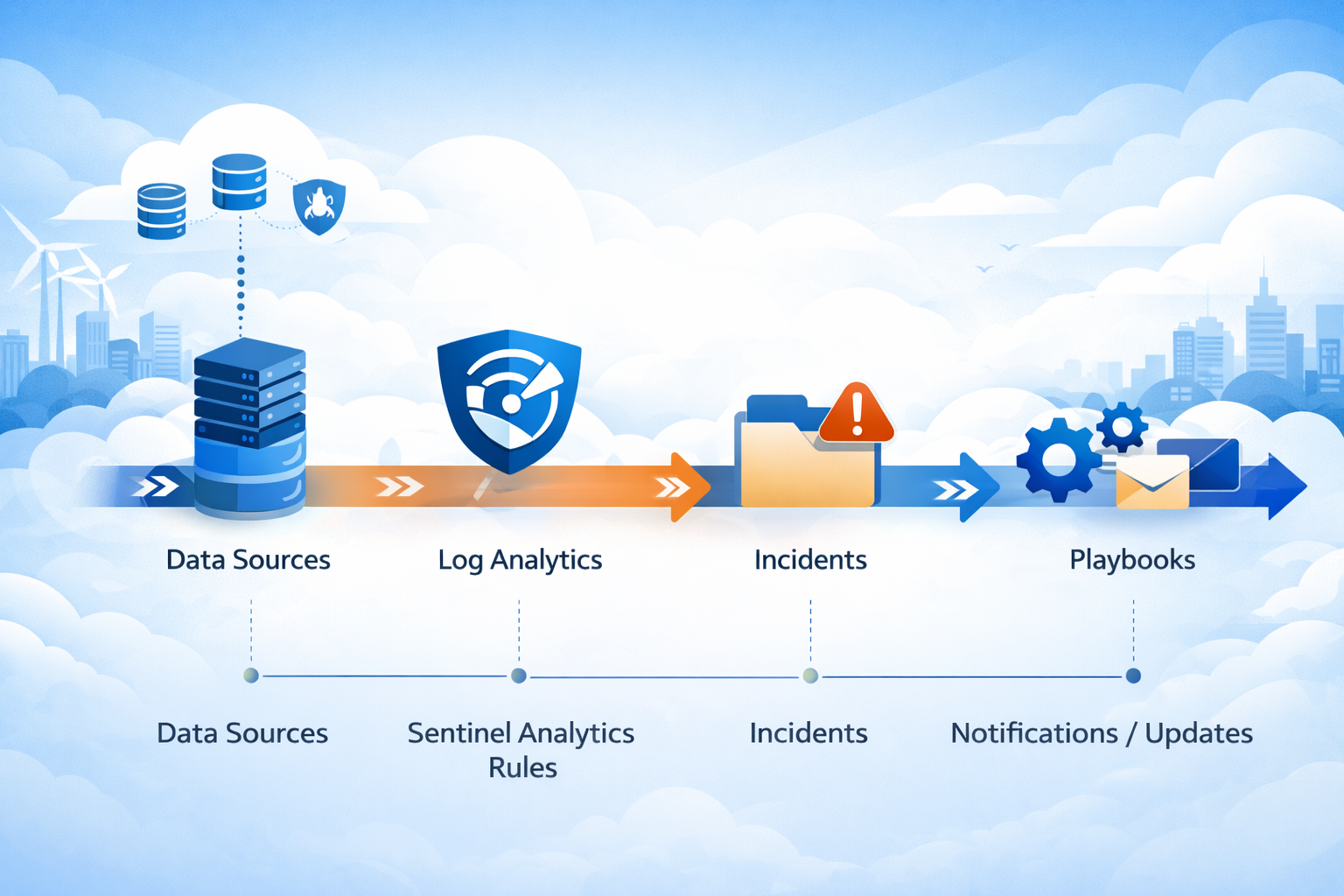
Data Sources → Log Analytics → Sentinel Analytics Rules → Incidents → Playbooks → Notifications / Updates
Azure Activity Logs / Defender Alerts
            |
            v
   Log Analytics Workspace
            |
            v
     Microsoft Sentinel
  (Analytics Rules + Incidents)
            |
            v
   Automation Rules / Playbooks
 (Enrichment + Incident Updates)
Tools & Services Used
- Microsoft Azure (Subscription, Resource Group, RBAC)
- Log Analytics Workspace
- Microsoft Sentinel (SIEM)
- Microsoft Defender (signals integrated into Sentinel)
- Logic Apps (SOAR Playbooks)
- KQL (Kusto Query Language)
Prerequisites
- Azure subscription with permission to create:
- Resource Groups
- Log Analytics Workspace
- Sentinel (enable on workspace)
- Logic Apps
- Basic understanding of:
- RBAC roles (Reader, Contributor, Sentinel roles)
- KQL fundamentals (where, project, summarize, join)
Step-by-Step Build
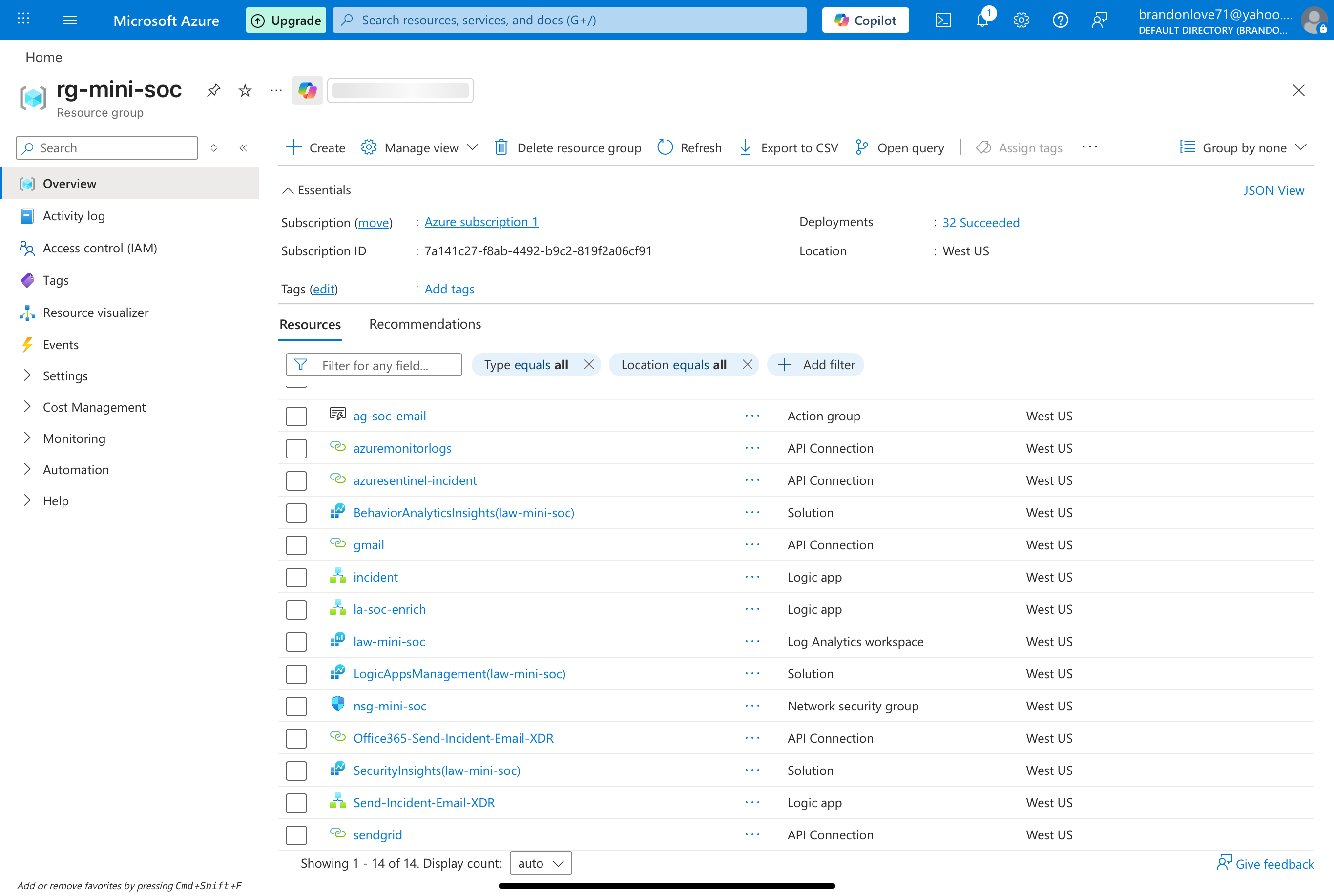
1) Create Resource Group + Log Analytics Workspace
- Create a new Resource Group (ex:
rg-sentinel-lab) - Create a Log Analytics Workspace (ex:
law-sentinel-lab) - Confirm workspace is active and reachable
2) Enable Microsoft Sentinel
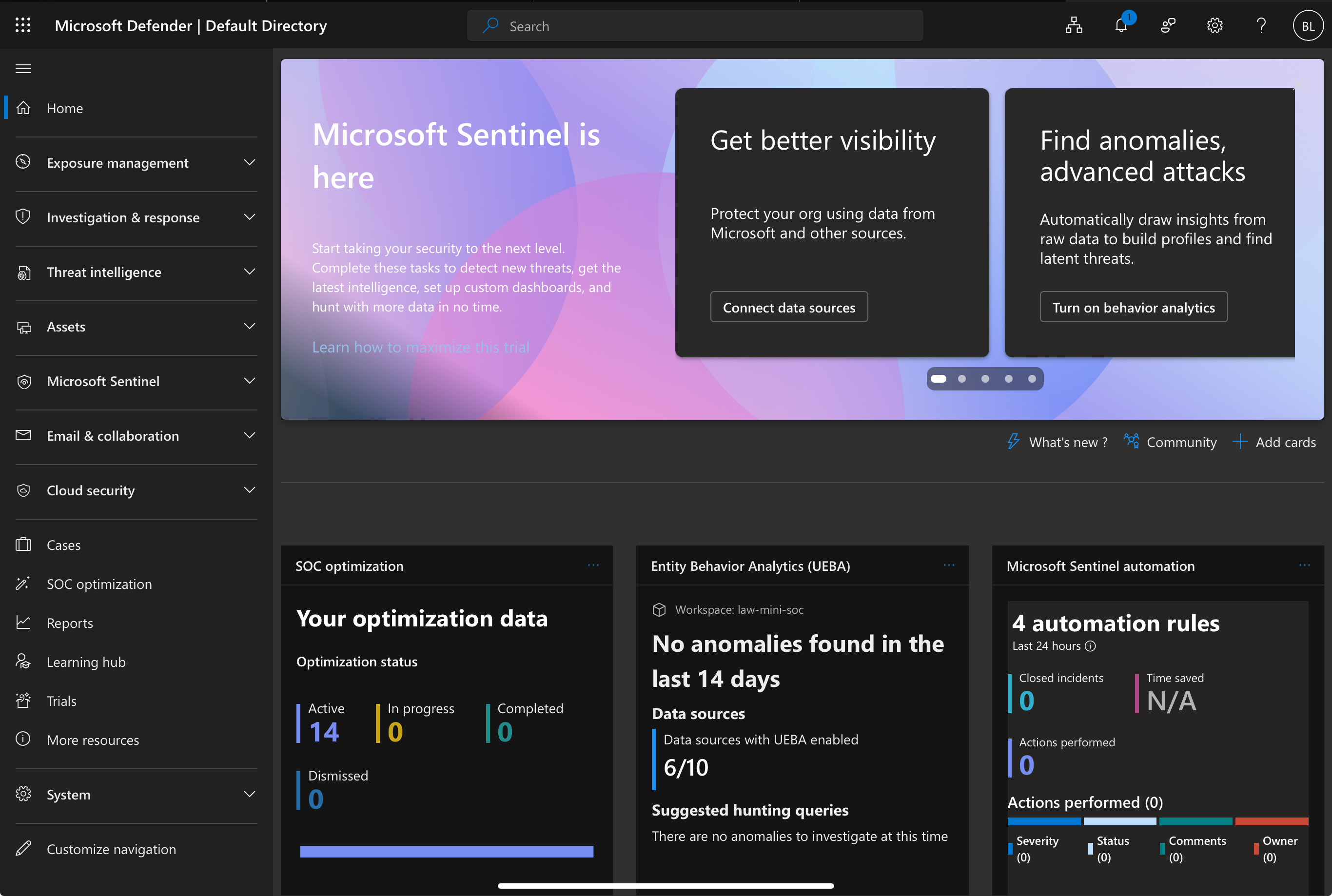
- Go to Microsoft Sentinel
- Select your workspace (
law-sentinel-lab) - Click Add / Enable
3) Connect Data Sources
A) Azure Activity (Cloud Control Plane)
- Connect Azure Activity data connector in Sentinel
- Ensure the subscription is sending Activity logs to the workspace
Validation Query (basic sanity check):
AzureActivity
| take 10
B) Microsoft Defender Integration (choose the one(s) you enabled)
- Defender for Endpoint / Defender for Cloud / Defender for Identity / Defender for Office 365
- Ensure Defender alerts flow into Sentinel incidents
Detections (KQL + Analytics Rules)
Detection #1: Suspicious NSG Security Rule Changes (AzureActivity)
Use Case: Detect changes to Network Security Group rules (potential persistence, exposure, lateral movement enablement)
AzureActivity
| where ActivityStatusValue =~ "Succeeded"
| where OperationNameValue has "networkSecurityGroups/securityRules"
| where OperationNameValue endswith "/write"
| project TimeGenerated, Caller, OperationNameValue, ResourceGroup, ResourceId, ActivityStatusValue
| sort by TimeGenerated desc
Turn this into an Analytics Rule
- Rule type: Scheduled
- Query frequency: 5–15 minutes (lab-friendly)
- Lookup period: 15–60 minutes
- Incident creation: On
- Entity mapping (recommended):
- Account:
Caller - Azure resource:
ResourceId
- Account:
- Tactics (suggested): Defense Evasion / Persistence (depending on scenario)
Incident Triage Workflow (How I Investigate)
When an incident fires, I:
- Review incident timeline + entities
- Confirm the who/what/where:
- Who: Caller / identity
- What: operation
- Where: resource group / resourceId / subscription
- Add context:
- Was this change approved?
- Does it open inbound 0.0.0.0/0?
- Is it targeting a sensitive subnet or workload?
- Decide response:
- Comment/tag only (benign)
- Escalate severity
- Trigger playbook to enrich and notify
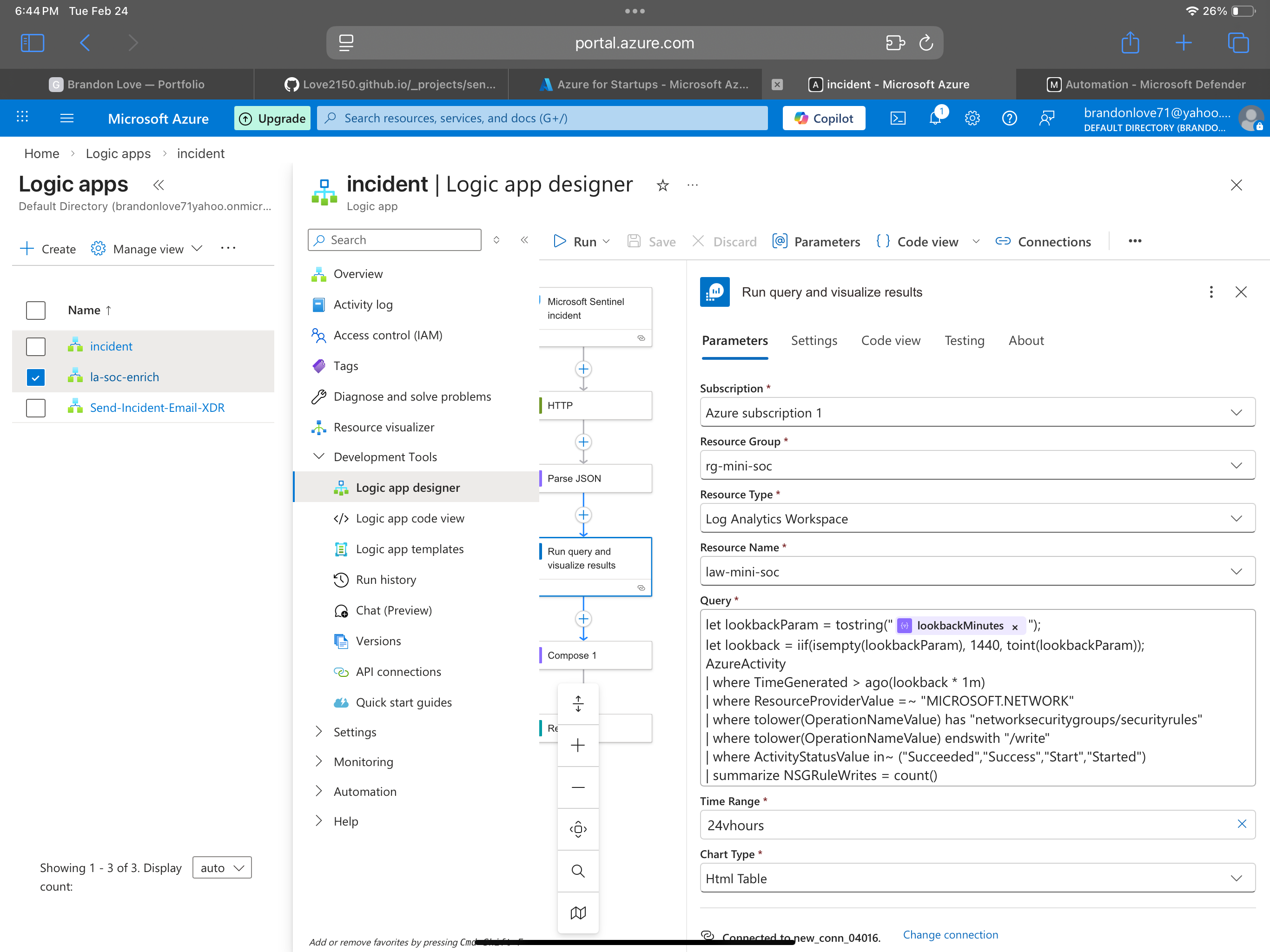
SOAR Automation (Logic App Playbook)
Playbook #1: Enrich + Comment on Incident
Goal: Add structured enrichment to the incident and standardize the analyst workflow.
Suggested actions inside the playbook
- Trigger: Sentinel incident created (or alert triggered)
- Initialize variables:
callerresourceIdtimeRange
- Run a Log Analytics query for recent related activity
- Compose an enrichment summary
- Update Sentinel incident:
- Add comment
- Add tag (ex:
nsg-change) - Optionally adjust severity
- Notify (optional):
- Teams / Email
Pseudo-flow
Trigger (Sentinel Incident)
  -> Parse JSON (optional but recommended)
  -> Compose / Variables (caller, resourceId)
  -> Run KQL query (related AzureActivity)
  -> Compose enrichment summary
  -> Update incident (comment + tags)
  -> Notify (Teams/Email) [optional]
Testing & Validation
I tested the pipeline by:
- Making a controlled NSG security rule change (lab-safe)
- Confirming the event appears in Log Analytics
- Confirming the Analytics Rule runs and generates an incident
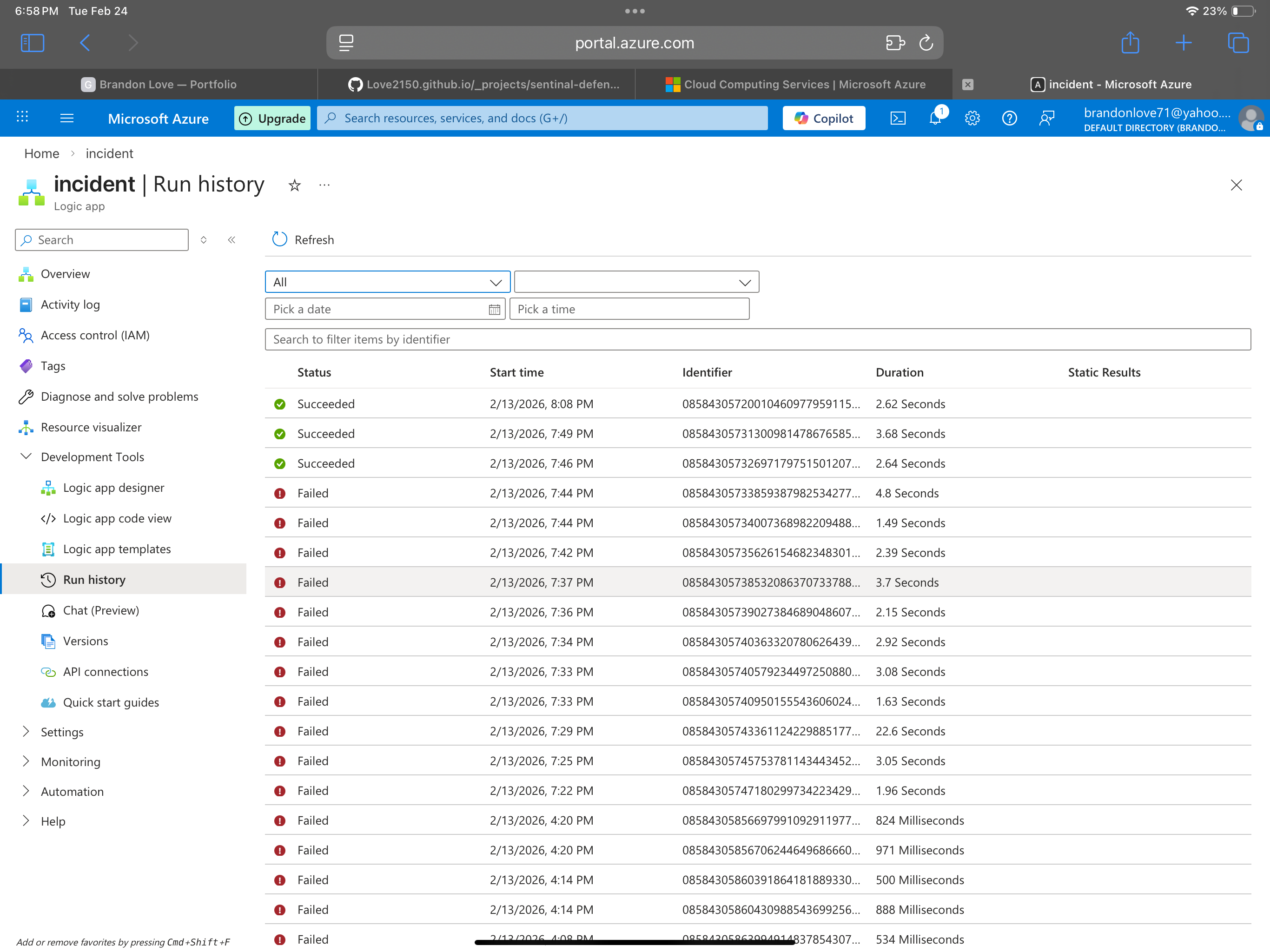
- Confirming the Playbook triggers and records a successful run
Evidence still to capture in a final validation pass
- Log exists in AzureActivity table
- Analytics rule match found
- Incident created with expected entities
- Playbook ran successfully
- Incident contains enrichment comment/tags
MITRE ATT&CK Mapping (Initial)
Mapping depends on the scenario, but common mappings for control-plane changes include:
- T1562 Impair Defenses (if rules disable protections)
- T1078 Valid Accounts (if attacker uses legitimate identity)
- T1098 Account Manipulation (if identity permissions changed elsewhere)
- T1578 Modify Cloud Compute Infrastructure (broader cloud control changes)
Lessons Learned / Notes
- KQL tuning matters: reduce noise by filtering:
- Specific resource groups
- Known admin accounts
- Approved change windows
- Entity mapping makes incidents more actionable
- Playbooks are most valuable when they standardize triage:
- Add context automatically
- Reduce time-to-decision
- Create consistent documentation trails